
Categories
Blog Data Governance

Data Governance Tools for Enterprises: How to Choose the Right Platform

You may have noticed that your data is now literally everywhere. From spreadsheets to cloud storage, your workplace now runs entirely on different data sources.

But without proper enterprise data governance, all this data is just creating more noise.

To make it meaningful, you need to check and optimize it for better usage regularly.

This is where establishing the right data governance framework comes into play. But even implementing it successfully requires choosing the right platform and process strategy.

To help you in your enterprise data governance, I have created this detailed guide. It will help you recognize the top data governance tools you can choose from.

Let’s dive in deeper by first understanding what data governance tools can enable for you.

What Are Data Governance Tools? 

Before choosing the right tool, let’s first understand their needs and benefits.

Using data governance tools can help you both manage and protect your data assets. You can achieve this by:

  • Finding all of your data points across multiple systems
  • Create your own searchable inventory 
  • Cross-checking if your data is completely accurate 
  • Ensuring only the right people can see your sensitive information 
  • Proving to your auditors that you follow the right regulations

Data governance consulting services CTA banner by Augmented Systems with “Talk to Us” call to action

Top Data Governance Tools – Quick Comparison

Tool Best For Key Strength Deployment
Microsoft Purview Microsoft shops Deep integration with Office 365, Azure Cloud + Hybrid
Informatica IDMC Large enterprises Comprehensive governance + data quality Multi-cloud
Collibra Business-user adoption Intuitive interface, collaboration focus Cloud
Alation Data intelligence Behavioral analytics, AI-powered insights Cloud
Atlan Modern data teams Workspace-like experience, automation Cloud
AWS DataZone AWS users Native AWS integration, data mesh support Cloud
Google Cloud Data Catalog Google shops Simple, integrated with BigQuery Cloud
Databricks Unity Catalog Lakehouse architecture Unified governance across data + AI Multi-cloud
Solidatus Lineage visualization Visual mapping, regulatory compliance Cloud + On-prem
IBM Data Governance Regulated industries Mature compliance features Hybrid

How to Choose The Right Data Governance Tool?

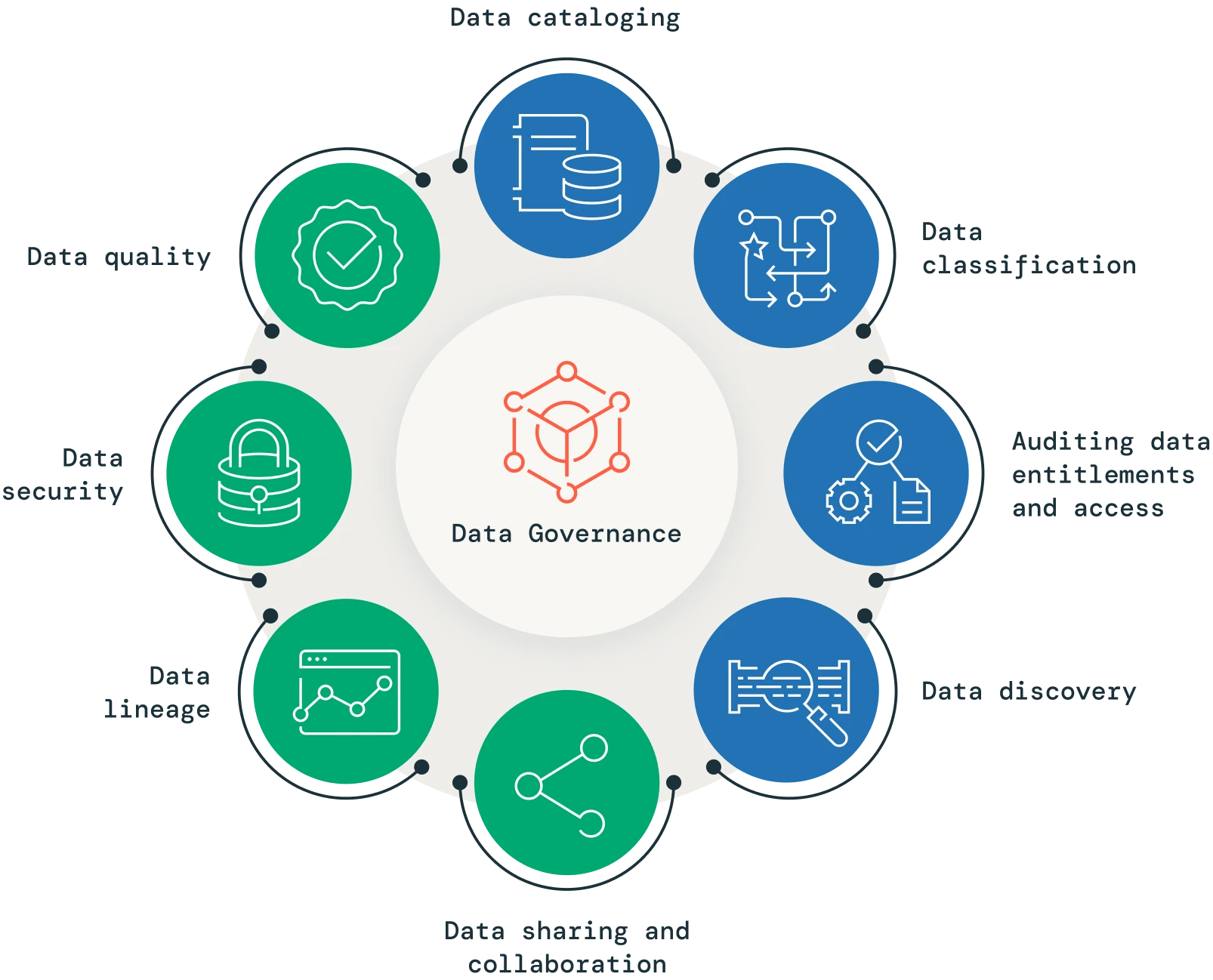
Infographic outlining the 8 key factors for choosing a data governance tool, including data cataloging, classification, security, and quality.

Here is how you can make your choice easier: 

  • Prioritizing your business requirements 

Make sure that you choose the tool that suits your exact business needs.

Consider asking yourself questions like:

  • What is my main data challenge? 
  • Who is actually going to use this platform? 
  • What are the regulations this platform needs to adhere to? 

Questions like these will help you make the right decision while browsing data governance tools.

  • Opting for the right architecture fit

Every tool requires some customization to work well with your current workflow.

While choosing your data governance tools, consider:

  • Whether you need a cloud or an on-premise (local) tool
  • If your current tech-stack needs multi-cloud support 
  • Can the data source connect with your existing databases
  • Calculating the total cost of your ownership

Budgeting for your new data governance tool is very important. But before you start looking at the final prices, keep these hidden costs in check as well:

  • Integration or consulting fees
  • Training costs for your team
  • Ongoing maintenance and upgrades 
  • Complete integration with your existing systems
  • Advanced Automation and AI Capabilities

Most modern enterprise data governance solutions integrate AI capabilities.

Using these AI or automation features can help make your work easier. To check for these features, look out for features like:

  • Automated classification of data 
  • Better AI-powered recommendations
  • Automated error detection 
  • Convenient natural language querying

Best Data Governance Tools in 2026

Here are the top platforms you should consider for your data governance:

  • Microsoft Purview 

This unified data governance service can help you manage your data more efficiently.

It provides benefits like:

  • Great integration with Microsoft 365 and Teams 
  • Automated classification of your data
  • Secure data quality screening 
  • Virtual network support and deployments
  • Informatica Intelligent Data Management 

Informatica is well known as a market leader in data governance. combines data quality, integration, and governance within a single app.

Some of its key features include:

  • AI-powered data discovery 
  • More than 300 connectors 
  • Advanced multi-cloud deployment
  • Collibra 

By making data governance more accessible, Collibra can reach a broader target audience.

It boasts a uniquely intuitive interface. This makes it accessible to both technical and business audiences.

Collibra’s best features include:

  • Intuitive data lineage visualization
  • Business-friendly cataloging of data 
  • Integrated marketplace for data products

Data Governance Software Comparison: Key Questions

Here are the questions you should ask while evaluating your vendors:

Question Why It Matters
How many native connectors do you have? Determines whether all your data sources will integrate
Can we deploy in our preferred cloud? Avoids vendor lock-in
What automation features are included? Reduces manual effort over time
How does pricing scale with data volume? Prevents cost surprises
What implementation support do you offer? Affects time-to-value
Can we see similar industry case studies? Proves relevance to your needs

Best Practices for Implementing Data Governance 

Here are the steps you should follow to gain success in your data governance strategy:

  1. Start small and pick the most important data to manage 
  2. Ensure your business stakeholders are made aware 
  3. Use the best data migration practices 
  4. Clean your data before starting governance 
  5. Use automation where possible
  6. Measure progress and track metrics on a daily basis

Enterprise data governance solutions CTA banner addressing data chaos with “Get in Touch” button

Conclusion  

Selecting the best data governance tools relies on making an informed decision.

Choosing the right platform will ensure that both your business and your teams remain empowered. It will prolong your business’s lifespan and protect your data. 

Just make sure you take your time when making this choice.

Planning a major governance initiative at your business? You will then need the expert guidance of Augmented Systems.

Our teams are dedicated to helping enterprises like yours select the right data governance tool. We help you implement the right enterprise data governance solutions for your business.

We fully understand the complexities of this implementation. Moreover, our exceptional data migration services are assuredly reliable.

Years of experience have made us aware of the challenges we can face during this process.

To govern your data without such issues, contact Augmented today. You can gain access to expert advice and even a free consultation!

FAQs 

1. What are data governance tools?

Data governance tools are software platforms that help organizations manage, protect, and understand their data assets. They handle data discovery, cataloging, quality management, access control, and compliance tracking across databases, cloud storage, and applications.

2. Which are the best data governance tools for enterprises?

The best data governance tools for enterprises include Microsoft Purview for Microsoft shops, Informatica IDMC for complex environments, Collibra for business-user adoption, Alation for data intelligence, and Databricks Unity Catalog for lakehouse architectures. The right choice depends on your specific needs.

3. What is enterprise data governance?

Enterprise data governance is the framework of policies, processes, and tools that ensure an organization’s data is accurate, secure, and usable. It defines who can take what action, with what data, under what circumstances, and across which business areas.

4. How do cloud data governance tools differ from on-premise?

Cloud data governance tools offer scalability, automatic updates, and lower upfront costs than on-premises solutions. They’re designed for modern architectures with distributed data across multiple cloud platforms, while on-premises tools often offer greater control for regulated industries.

5. What should I look for in a data governance software comparison?

When comparing data governance software, evaluate connector coverage, deployment flexibility, automation features, total cost of ownership, and industry-specific capabilities. Always request a proof-of-concept with your actual data before committing.

Categories
Blog Data Analytics

Real-Time Data Analytics: Benefits, Use Cases & Implementation Strategy

Still waiting on your data analytics to create your strategy?

Waiting until tomorrow to know what happened today is no longer viable. While you are stuck on “calculating”, your competitors have already begun their strategy execution.

That is where real-time data analytics comes in. They fundamentally change the way you use your data for improvements.

In this guide, I will help you understand exactly what real-time analytics is. We will also explore why it matters and how you can implement it within your own business.

Ready to learn something new about the modern way of using your data? Let’s get started!

What is Real-Time Analytics?

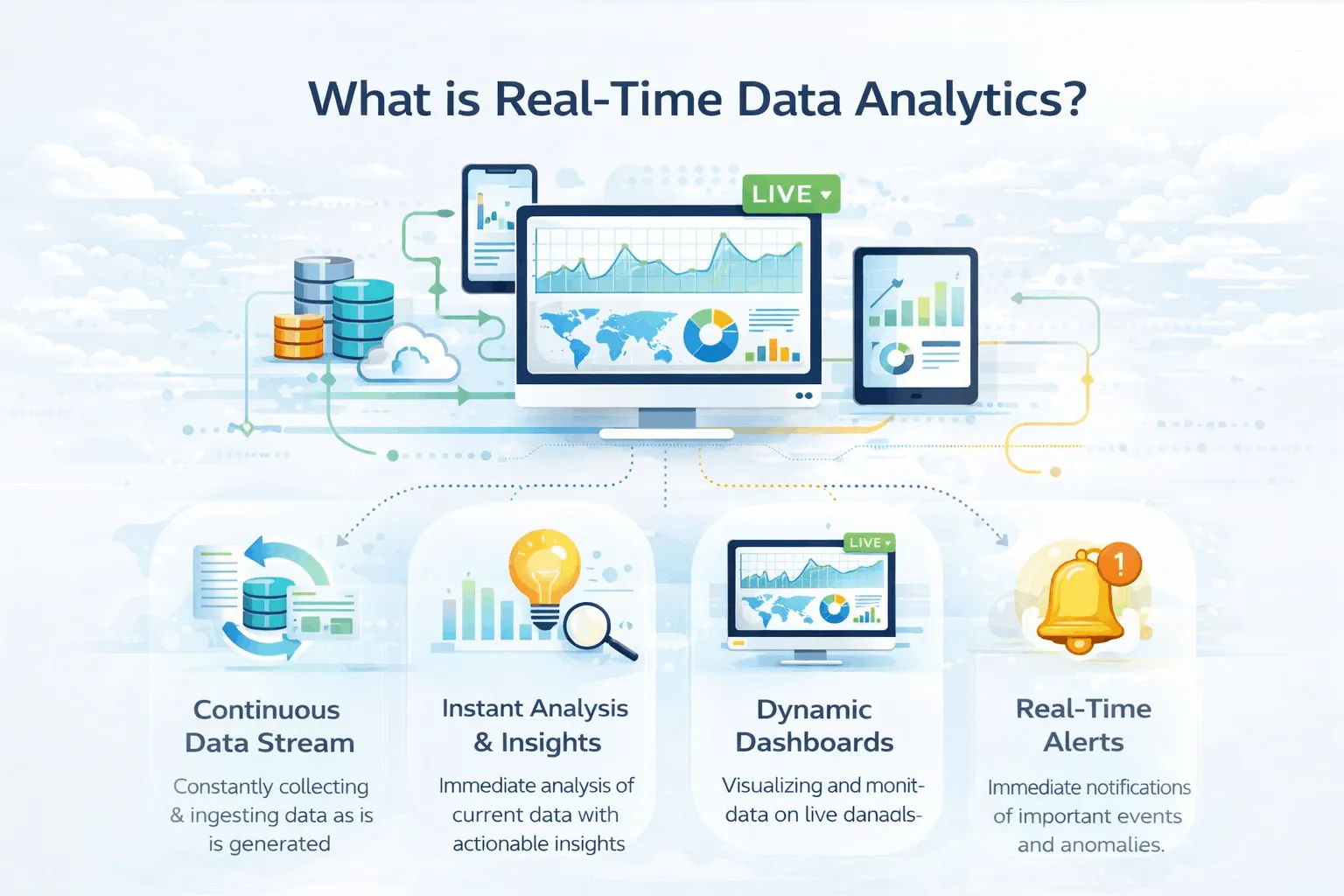
Illustration explaining real-time data analytics including continuous data streaming, instant insights, dynamic dashboards, and real-time alerts

Well, real-time analytics is a simple concept where you not only process your data in real time but also analyze it as soon as it is generated. This is a big advantage because you do not have to wait days to receive results from your data.

You also do not have to run a batch process to receive results from your data. Instead, you receive them in real time. You can even use them to power your data visualization services.

This is a significant advantage because you can rapidly improve your strategy.

Comparing Real -Time vs. Traditional Analytics 

Here is how using real-time analytics differs from traditional methods:

Aspect Traditional Batch Analytics Real-Time Analytics
Processing speed Hours or days Milliseconds to seconds
Decision timing After the fact While it’s happening
Data freshness Stale by the time you see it Always current
Typical use Historical reporting, trend analysis Fraud detection, live monitoring
Infrastructure Batch ETL jobs, data warehouses Streaming platforms, event processing

Key Benefits of Real-Time Data Analytics 


So, how can real-time
data analytics actually help scale your business?

The secret lies in its numerous benefits. These include:

  • Access to Instant Decision-Making 

As data is continuously analysed, you or your team can detect issues more easily. This leads to looking for both risks and opportunities as they occur.

Moreover, this also helps in emergency situations. For example, a fraud detection system is useless if it can’t detect it in milliseconds.

Get instant analytics from your data with streaming analytics solutions by Augmented Systems

  • Better Customer Experiences

Real-time analytics makes it much easier to detect buyer behavior. 

This means that a customer adding items to their cart can be instantly prompted with a discount.

  • Higher Operational Efficiency

Monitoring your business in real-time can help you fix issues as they occur.

Sensors can use real-time data analytics to predict failures. They can even schedule maintenance before failures happen.

  • Competitive Advantage 

It is always important to stay up to date with your competitors.

With this new method, you can optimize your pricing and launch media campaigns instantly.

To build faster streaming pipelines, teams often rely on ETL tools that support continuous ingestion and transformation.

Streaming Analytics Use Cases (By Industry)

Let us look at actual streaming analytics use cases observed across global sectors:

Industry Use Case How It Works
Financial Services Fraud detection Analyze transactions in milliseconds to block suspicious activity
E-Commerce Dynamic pricing Adjust prices based on demand and inventory
Healthcare Patient monitoring Stream vitals directly to alerting systems
Manufacturing Predictive maintenance Monitor equipment sensors to predict failures
Transportation Logistics Optimize routes based on current traffic
Media Personalization Serve personalized content recommendations

Implementation Strategy of a Real-Time Analytics Architecture

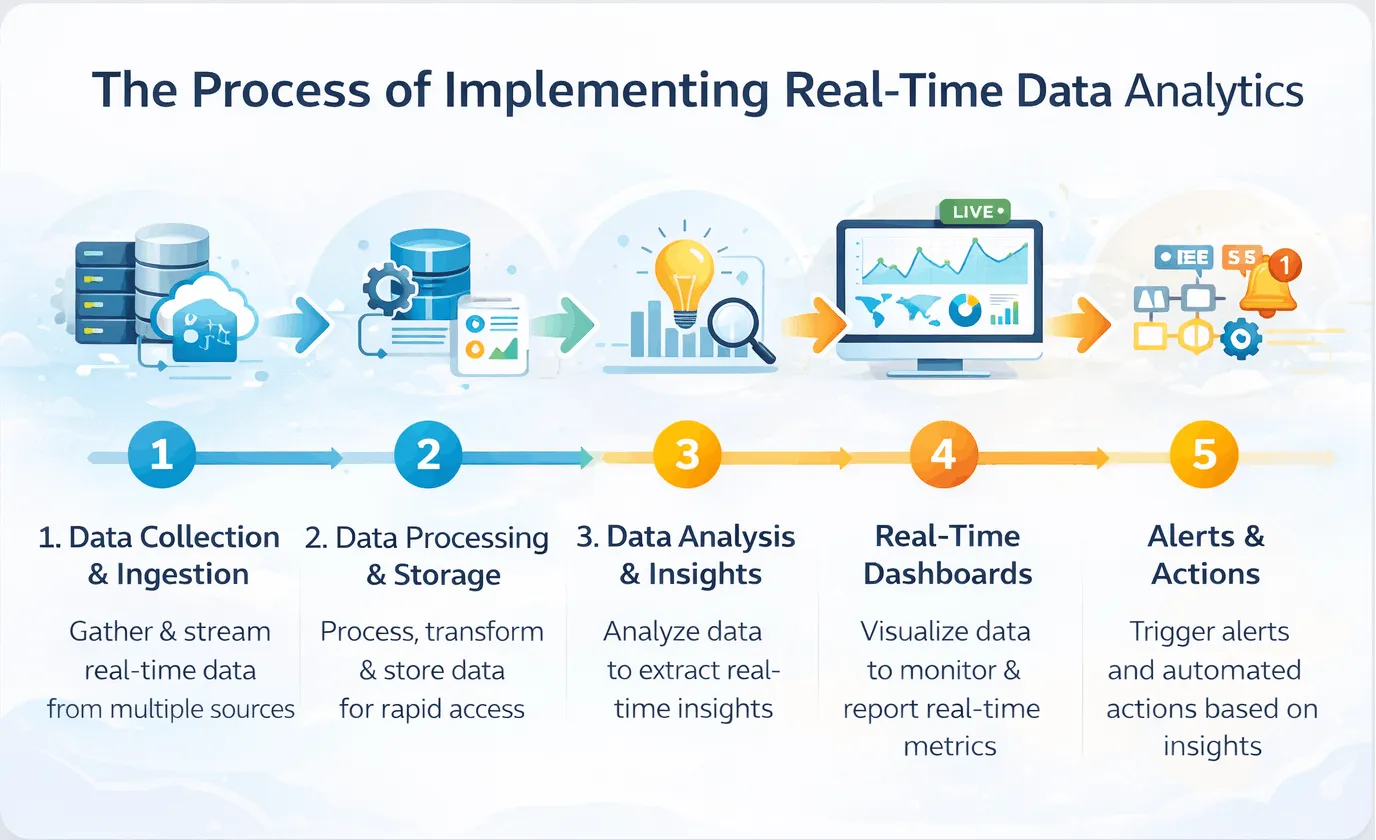
Step-by-step process of implementing real-time data analytics architecture including data collection, processing, analysis, dashboards, and alerts

Looking to implement a strong real-time analytics architecture? 

Ensure that you follow the steps I have mentioned below:

  • Identifying your best use cases

Never try to implement real-time analytics everywhere in your business.

Instead, consider prioritizing your needs. This means selecting high-priority use cases like:

  • Fraud detection if you work in finance 
  • Inventory sorting, if you are in retail
  • Monitoring equipment, if you are in manufacturing
  • Start With Change Data Capture (CDC)

CDC is a system that detects database changes and streams them straight to your central analytics system. This is the base foundation of any real-time pipeline.

Using CDC can help you detect changes in your business and reduce your overhead.

  • Building a Unique Streaming Pipeline 

You can easily design a pipeline for your business using these layers: 

  • Ingest (Capturing Data)
  • Buffer (Handling Throughput)
  • Process (Transforming data)
  • Serve (Loading data into dashboards)
  • Monitoring and Optimizing Data 

Real-time systems require continuous monitoring to function properly.

Such monitoring requires tracking latencies and error rates. You will also need real-time alerts for any data pipeline failures.

  • Iterate and Expand 

Successfully implemented your real-time data analytics system?

Now, it’s time to expand.

Continuously add more options to keep making your business easier to monitor and optimize.

A scalable streaming setup also depends on data migration frameworks that keep data movement reliable across systems.

Need real-time insights? Get expert data architecture consulting from Augmented Systems

Conclusion 

Real-time data analytics are not something you can consider as an option. Instead, it has become essential to survive in the current competitive market.

For the best results, I suggest that you partner up with a dedicated expert. I recommend choosing Augmented Systems for your needs.

We have a team of experts who can help you select appropriate tools and strategies for a successful implementation. They can also provide you with helpful data visualization services.

Moreover, our strategies can help you build real-time analytics. We help prioritize the exact use cases you need to tackle first. 

From architecture design to tool selection, the team at Augmented can handle every data challenge.

So are you ready to make your data work for you? Contact Augmented Systems today and get instant insights from your data.

Once live insights are available, using strong data visualization examples makes it easier to turn real-time signals into action.

FAQs 

1. What is real-time data analytics?

Real-time data analytics is the process of analyzing data as soon as it’s created, within milliseconds or seconds. Unlike traditional batch processing that runs daily or hourly, real-time analytics lets you act on insights while events are still happening.

2. What are common streaming analytics use cases?

Popular streaming analytics use cases include fraud detection in banking, dynamic pricing in e-commerce, patient monitoring in healthcare, predictive maintenance in manufacturing, and real-time logistics in transportation—any situation where immediate action matters benefits from real-time processing.

3. How does real-time analytics architecture work?

A modern real-time analytics architecture includes four layers: data ingestion (using tools like Kafka), stream processing (with Flink or Spark), storage (often in data lakes with Iceberg), and serving (via APIs or dashboards). This pipeline processes data continuously with sub-second latency.

4. What are the best real-time data analysis tools?

Leading real-time data analysis tools include Apache Kafka for streaming data, Apache Flink for processing, Tinybird for real-time APIs, and cloud services such as AWS Kinesis and Google Pub/Sub. The right choice depends on your infrastructure, team skills, and latency requirements.

5. What industries benefit most from real-time analytics?

Financial services use it for fraud detection, retail for dynamic pricing, healthcare for patient monitoring, manufacturing for predictive maintenance, and media for personalization. Any business that can act faster than its competitors gains a significant advantage.

Categories
Blog Data Migration

What Is Data Cleansing? Definition, Process, Tools & Best Practices

Every skilled professional knows that messy data is a huge problem. 

Past studies show that poor data quality results in losses of over U.S. $3 trillion per year. This is the cost businesses have to share just because they did not clean their data properly. 

So, what is data cleansing? Mainly, it refers to finding and fixing errors hidden in your raw data. This includes removing any duplicates or missing values that may cause issues in the future. 

How do you properly achieve this cleansing? Well, it requires a lot of important steps! 

To make it easier to understand, I have created this detailed guide. This will help you learn more about the basic data cleaning definition using practical data cleansing examples. 

Let’s start by understanding what it actually means.

What Is Data Cleansing?

It is important to get a clear data cleansing definition before beginning the process. 

Data cleansing is the identification and correction of errors and inaccuracies in your datasets. It includes performing actions like: 

  • Removing duplicate records 
  • Inputting any missing values
  • Standardizing formats like dates and times
  • Fixing any typos or spelling mistakes
  • Ensuring the accuracy of data

For example, if you have two entries for “Thomas William”, you need to merge them. Duplicate entries like these can lead to false results when you process your datasets. 

Without such proper cleansing, your reports will have false results. Even one incorrect name or data point can ruin the entire report and affect your prediction accuracy. 

You may waste money marketing twice to a single customer. You may even think you have more customers than you actually do. All of these can be avoided by cleaning your data beforehand. 

Why Does Data Cleansing Matter?

Did you know that analytics teams reportedly spent around 45% of their time just cleaning and preparing data? 

That means spending almost half their time simply cleaning their data instead of finding actionable insights. Sounds like a waste of time, right? 

Well, it’s not. The cost of ignoring the quality of your data is monumental. Poor data analytics can result in financial losses, wasted time, and even incorrect future insights. 

What about when your data is clean? If done well, it can lead to benefits like: 

  • Improved decisions as you get more confident about your numbers
  • More accurate reports leading to more consistent team collaboration
  • Faster analytics that don’t suffer or break due to errors in the data
  • Better service for your customers as you have the correct information

Top Data Cleansing Techniques 

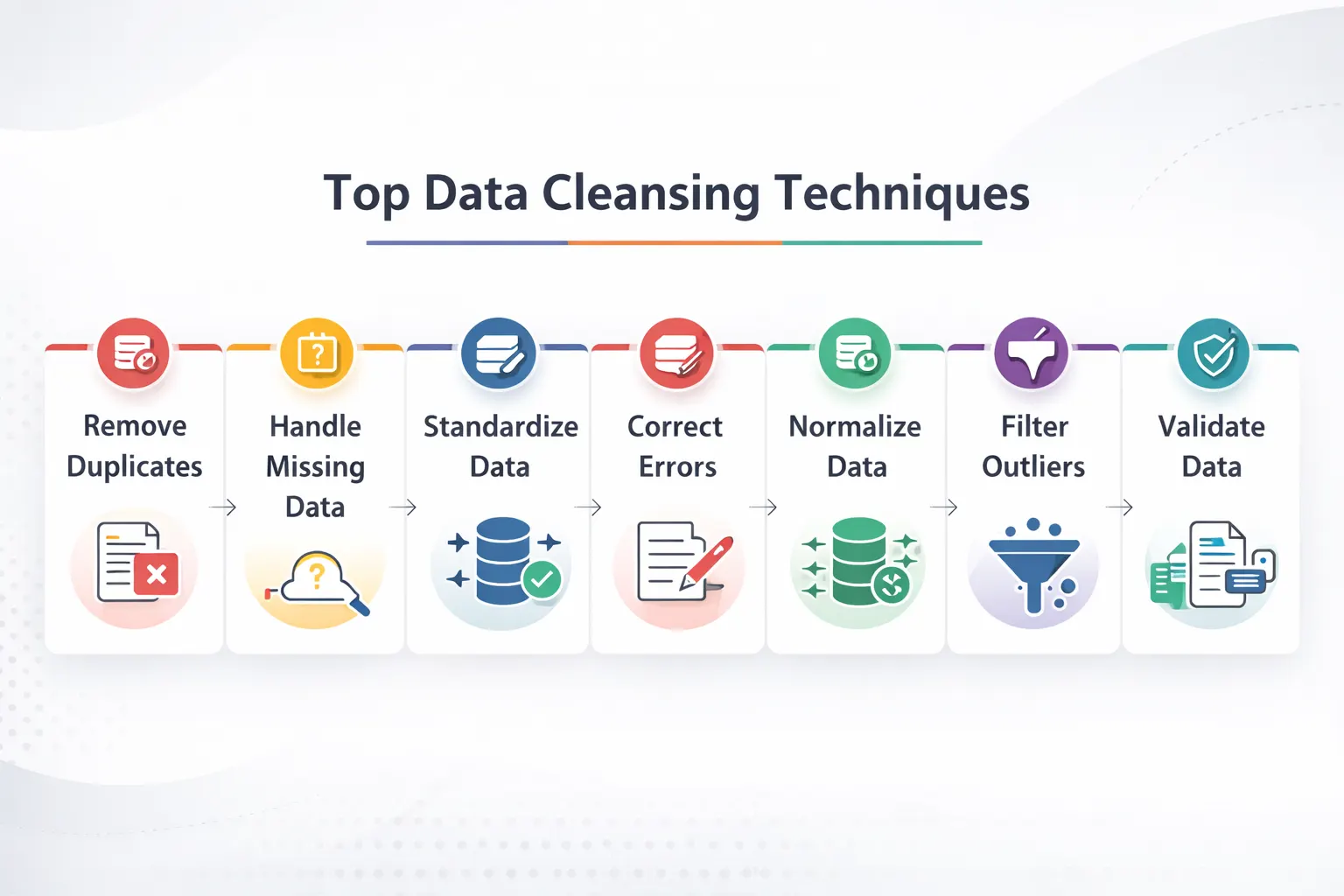
top data cleansing techniques

Here are the main data cleansing techniques that you can use for cleaning your messy data:

1. Finding and Correcting Duplicates

Duplicate records occur when details of people or transactions are entered twice. 

The two types you need to look for include: 

  • Exact duplicates: Identical duplicates that are easy to spot and remove. 
  • Similar Duplicates: These are duplicate entries with slight variations, such as “John Simon” and “Jon Simon”. Such entries require smarter detection and removal strategies. 

2. Handling Any Missing Values 

Missing any data? Instead of deleting valuable information, you can try the following methods: 

  • Use Averages

Replace the missing numerical values with the column’s average value. This will have minimal impact on your report while ensuring other values are usable for processing.

  • Forward/Backward Fill

For any time series data, you can use the previous or next value to replace the missing data point.

  • Use Business Logic

Any missing transaction amounts can be marked as zero. For missing customer information, you can mark it as “unknown”. This will retain the values in your data set rather than deleting the entire entry. 

After understanding the process, the next step is choosing data cleaning tools that automate profiling, standardization, and error removal.

3. Standardize Your Formats 

A frequent problem that arises in data warehousing is inconsistent formatting. This leads to data sets failing to be properly grouped or joined together in tables.

To prevent such issues, consider standardizing the following factors: 

  • Text: Use consistent spacing and capitalization
  • Dates: Ensure all dates follow the same Data, Month and Year format
  • Categories: Group similar values under labels 
  • Phone Numbers: Remove any dashes or special characters

How does this work? A good data-cleansing example is converting all dates to the “DD/MM/YYYY” format to ensure proper sorting.

4. Dealing with Outliers

Outliers are extreme values or data entry mistakes that can ruin your entire report. For example, a wrong decimal can turn “$78.00” into “$7800”.

To prevent this, use statistical methods and business rules to identify such mistakes. These include smart formatting, such as “number only” for dates and amounts.

You can also use conditional formatting like “ages can’t be negative” to ensure correct values.

What Are Data Cleansing Best Practices?

Below are the best data cleansing practices that can help you save valuable time:

1. Begin with Data Profiling

Before understanding what data cleansing is and how to use it, you first need to understand your data.

Ensure that you run the basic analysis on your data, like:

  • Identifying the missing values in your columns
  • The min and max values
  • Any unique values that appear in category fields

This type of “data profiling” helps you identify problems in your data. It can help you choose the right approach towards data cleansing tools.

2. Create Processes You Can Repeat

Cleaning data manually can be very difficult. Thankfully, you can use automated scripts and tools that can do this for you.

Data cleansing should follow a repeatable, easily codable logic. This will help you control and test the process for easier repetition.

3. Document Everything

Report each step in your data cleansing process and document it. This will help you audit and troubleshoot any issues faced during this process.

Such documents will help you identify any inconsistencies or data deletions during your cleansing.

4. Test Your Results

Done with your data cleansing? Make sure that you verify your data:

  • Check for any missing values after the process 
  • Compare your data distributions before and after the cleansing
  • Run sample reports to make sure everything looks great

5. Iterate and Improve

Data cleaning is an evolving process. As your business needs grow, you will have new data that needs cleansing.

Ensure you stay up to date with the latest trends and update your tools.

In larger pipelines, ETL tools help apply cleansing logic before data reaches analytics platforms.

Popular Data Cleansing Tools

Confused about which data cleansing tools you should use? Here are my recommendations:

Tool Category Examples Best For
Programming Libraries Python (Pandas), R (tidyverse) Custom, flexible cleaning for data scientists
Open Source Tools OpenRefine, Dedupe Interactive cleaning and duplicate detection
Validation Frameworks Great Expectations, dbt tests Automating data quality checks
Enterprise Platforms Informatica, Talend Large-scale, organization-wide data governance


Conclusion: From Clean Data to Real Business Value

Data cleansing is the foundation of every great decision you make as a team in your business. It is what enables a great company to expand into a global giant.

But for more accurate reports and better forecasting, you need to make a lot of effort. This will require the right skills, using the right tools, and the perfect approach.

Instead of wasting your team’s valuable hours to get inconsistent results, why not hire an expert? They can partner with your team to provide incredibly accurate data cleansing at lower business costs.

For Excel and BI workflows, Power Query in Power BI is a practical option for cleaning messy datasets before reporting.

At Augmented Systems, we specialize in transforming any messy data into clear insights. Our experts do the heavy lifting for you, building a reliable pipeline from your clean data.

Our years of experience serving global industry leaders have refined our approaches and made them more efficient. Whether it’s data migration services or building dashboards, our team at Augmented is always at your disposal.

Ready to make your messy data work for you? Contact Augmented Systems today to build a smarter future for your business!

FAQs

1. What is data cleansing in simple terms?

Data cleansing (also called data cleaning) is the process of finding and fixing errors in your data. This includes removing duplicates, filling missing values, standardizing formats, and correcting typos. The goal is to make your data accurate, consistent, and ready for analysis.

2. What are the key data cleansing techniques?

Common data cleansing techniques include removing duplicate records, handling missing values (e.g., using averages or forward fills), standardizing formats (e.g., dates and text), detecting and removing outliers, and validating data against business rules. Each technique addresses a specific type of data problem.

3. Why is data cleansing important for businesses?

Data cleansing benefits include more accurate reporting, better decision-making, improved customer insights, and increased team productivity. Studies show poor data quality costs U.S. businesses over $3.1 trillion annually, and analytics teams spend nearly half their time cleaning data instead of analyzing it.

4. What tools are used for data cleansing?

Popular data cleansing tools range from programming libraries such as Python (Pandas) and R (tidyverse) to open-source platforms such as OpenRefine. Enterprise tools such as Informatica and Talend handle large-scale cleansing, while validation frameworks such as Great Expectations automate ongoing data quality checks.

5. How does data cleansing relate to data migration?

Data cleansing is a critical part of any data migration services project. Before moving data to a new system, you must clean it to ensure formats match, duplicates are merged, and errors don’t carry over. Professional data migration services include cleansing as a key step to protect your new investment.


Categories
Blog Data Migration

Top ETL Tools in 2026: Features, Pricing, and Use Cases

In today’s world, most companies rely on large amounts of data to function day to day. But this data is usually stored across multiple platforms. To access it, you need to open different apps and platforms at work every day painstakingly.

Having your data from CRMs, databases, and spreadsheets in one place can help solve this problem. And that is exactly what ETL tools can do.

These ETL tools take data from different sources and put it in a unified form. Then, they put this unified data into your data warehouses.

Sounds perfect, right? Well, that might be true, but only if you pick the right ETL tool for your data migration framework.

To help you pick the best tool, I have compiled this comprehensive list of the top ETL tools for 2026. Whether you are looking for an enterprise solution or free, open-source ETL tools, you will find your match in this guide.

Let’s begin with a quick look at my top choices.

Quick Comparison: Top ETL Tools 

Here is a brief overview of the best ETL tools available today.

Tool Best For Key Strength Connectors
Hevo Data No-code teams Simple, reliable pipelines 150+
Fivetran Analytics teams Zero-maintenance pipelines 700+
Airbyte Technical teams Open-source flexibility 600+
Informatica Large enterprises Data governance & scale 300+
Talend Hybrid deployments Data quality & integration 900+
Matillion Cloud warehouse users Pushdown ELT optimization 150+
AWS Glue AWS ecosystem users Serverless Spark AWS-native
Azure Data Factory Microsoft shops Hybrid cloud connectivity 90+
Google Dataflow Stream processing Unified batch/streaming GCP-native
Apache NiFi Real-time data flows Open-source, visual UI 100+
Databricks Lakeflow Big data & ML Lakehouse architecture Native + files

How to Find the Right ETL Tool?

etl processBefore exploring specific platforms, let us first understand how you can choose the perfect ETL tool:

  • Connector Breadth 

Any modern pipeline requires data sourcing from various sources. These include SQL databases, SaaS apps, and file storage. 

For ETL tools, more connectors mean more compatibility. Any ETL tool with a large number of connectors will require fewer gaps to fill with custom code.

  • Real-Time Capabilities

Many companies now require real-time inputs, such as Change Data Capture (CDC), with sub-minute latency. Features like these are critical for ETL tools to provide real-time insights.

  • Pricing Predictability 

Any ETL tool with a consumption-based model might seem cheap at first. But as your usage grows, so will your bills.

Your preferred ETL tool must have predictable costing that you can account for every month.

  • Ease of Use 

An ETL tool that is not easy to use or interactive defeats the entire purpose of the tool.

Make sure you can use the ETL tool effectively. This ensures the tool saves you time rather than making your work even more complex.

Top ETL Tools for 2026

  • Hevo Data

Best For: Teams looking for simple and reliable pipelines

Hevo Data can connect multiple data sources through a unified no-code interface.

It also has a self-healing architecture that retries automatically if it detects a failed execution.

Moreover, the schema changes are handled automatically without disrupting downstream processes.

Key Features: 

Visual pipeline builders, auto-healing, and real-time monitoring.

Pricing: 

Event-based pricing model that starts at $299/month. You can also use their free plan, which provides access to 1M events per month.


  • Fivetran

Best for: Any analytics team dependent on cloud warehouses

Fivetran is a great tool for managing ETL pipelines with over 700 pre-built connectors. It supports automatic schema drift handling.

For better governance, Fivetran also works natively with Databricks Unity Catalog.

Key Features: 

700+ connectors, native Unity Catalog integration, and built-in dbt support.

Pricing: 

Usage-based Monthly Active Rows (MAR). There is also a free plan available.


  • Airbyte

Best for: Engineering teams that require customizable ETL tools

Airbyte is an open-source platform that is fundamentally free to use. It supports over 600 connectors and many advanced features.

For Airbyte, you will only pay for managed infrastructure or enterprise features. The base platform carries no costs, helping you save on subscription fees!

Key Features: 

600+ connectors, dedicated Connector Development kit for customisation and CDC support

Pricing:

Free open-source code, pricing for managed cloud services


  • Informatica IDMC

Best For: Large enterprises that carry complex requirements

Informatica primarily targets enterprises with advanced governance needs. This includes combined connectivity with AI-assisted mapping.

Moreover, the tool also supports metadata management.

Key Features: 

300+ connectors, AI-assisted mapping, and petabyte-scale processing

Pricing: 

Custom enterprise licensing with 3-6 month implementations


  • Talend Cloud 

Best for: Organizations looking for a hybrid deployment

Talent supports over 900 connectors. This includes deeper integrations with ecosystems such as Hadoop and Spark.

Moreover, it also combines ETL with data quality and master data management.

Key Features

Over 900 components, visual code generation, and hybrid deployment

Pricing

Custom pricing for tiered plans


  • Matillion 

Best For: Teams looking for cloud-native ETL for Snowflake, BigQuery, etc.

Matillion mainly focuses on pushdown ELT architecture. It leverages your cloud warehouse compute power instead of requiring a dedicated server.

In 2026, the company also introduced its AI assistant ‘Maia’ for pipeline optimization.

Key Features: 

Pushdown ELT, cloud warehouse optimization, and AI assistance

Pricing

Credit-based pricing model


  • AWS Glue

Best For: Organizations that are already dependent on AWS

AWS Glue is a serverless ETL solution based on Apache Spark. With a tight AWS integration, it can provide features like automated discovery and job scheduling.

Key Features: 

Serverless architecture, schema interfacing, and deep AWS integration

Pricing: 

$0.44/DPU-hour (DPU = Data Processing Unit)


  • Azure Data Factory 

Best For: Microsoft-centric enterprises

Azure Data Factory is a great ETL tool that supports hybrid cloud. It sources data from various destinations and provides on-premise cloud migrations.

Key Features: 

90+ connectors, visual and code-based development, and CI/CD workflows

Pricing:

Based on consumption and per-activity


  • Google Cloud Dataflow

Best For: Unified streaming and batch requirements

Using Apache Beam, Google Dataflow provides a unified architecture. It boasts serverless autoscaling.

Additionally, there are real-time use cases such as clickstream and fraud detection.

Key Features: 

Sub-second latency, auto-scaling, and Apache Beam compatibility

Pricing: 

Pay-per-use, depending on vCPU, memory, and data processed


  • Apache NiFi

Best For: IoT and hybrid streaming

Apache NiFi is a great open-source ETL tool. It provides an interactive flow design interface that is easy to understand.

The tool also supports automated data flow and provenance tracking for better efficiency.

Key Features: 

100+ connectors, real-time processing, and edge computing support

Pricing:

Free to use open-source tool

Many modern ETL tools now include data cleaning tools or built-in quality features to standardize records before loading.

How to Choose the Right ETL Tool?

Here is a handy guide on common situations and the best ETL tool for its specific needs:

Your Situation Best Tool Category Example Tools
No-code team that needs simplicity Low-code platforms Hevo Data, Matillion
Technical team that needs flexibility Open-source Airbyte, Apache NiFi
Large enterprise with governance Enterprise platforms Informatica, Talend
AWS cloud environment AWS-native AWS Glue
Microsoft shop Azure ecosystem Azure Data Factory
Real-time streaming required Streaming-optimized Google Dataflow
Big data + ML workloads Lakehouse platforms Databricks

If your project involves system replacement or cloud moves, data migration frameworks can complement ETL tools with a broader delivery structure.

Conclusion 

As ETL Tools continue to rise in 2026, you, as a buyer, will face many tough choices. One of these also includes deciding between ETL vs ELT for your data migration services

Whether it’s paid tools like Informatica or open source ETL tools like Airbyte, the choice depends on your exact needs.

While comparing ETL tools for your team, ensure that you consider your exact needs. These may include:

  • The number of connectors needed for your existing systems 
  • Deployment flexibility of your cloud environment
  • Latency needs for both real-time and batch scenarios 
  • The right pricing model 
  • Learning curve that your team can handle 

If you are planning a large-scale data project, your requirements will rise exponentially. To make sure your data stays secure, consider partnering with an expert for your data needs.

For professional guidance, I recommend consulting our experts at Augmented Systems. We specialize in helping organizations select the perfect ETL tools for their requirements.

Whether it’s for daily data unification or a massive data project, we can help you immensely. Our teams specialize in helping organizations select and implement the perfect ETL process for their current workflow.

Teams handling event-driven workloads should also understand real-time data analytics when evaluating modern ETL platforms.

Ready to make your data integration simpler and more efficient? Contact Augmented Systems today to receive the expert guidance you require.

FAQs 

1. What are ETL tools, and why are they important?

ETL tools are software platforms that extract data from various sources, transform it into a usable format, and load it into a destination like a data warehouse. They are essential because they automate data integration, save countless hours of manual work, and ensure your analytics are based on accurate, consistent information.

2. What is the difference between ETL and ELT tools?

The main difference is the order of operations. Traditional ETL tools transform data before loading it into the destination. Modern ELT tools load raw data first and transform it inside the data warehouse. This ETL tools comparison matters because ELT typically offers faster initial loads and leverages cloud warehouse power for transformations.

3. What are the best open source ETL tools available?

Popular open source ETL tools include Airbyte for its extensive connector library, Apache NiFi for real-time data flows, and Singer for lightweight pipelines. These tools offer flexibility, no licensing costs, and complete control over your data infrastructure, ideal for technical teams with specific customization needs.

4. How do cloud ETL tools differ from traditional on-premise solutions?

Cloud ETL tools like Fivetran, Hevo Data, and AWS Glue offer serverless architectures, automatic scaling, and pay-as-you-go pricing. Unlike traditional on-premise tools that require hardware maintenance and capacity planning, cloud solutions handle infrastructure automatically so you can focus on insights, not servers.

5. When should a company hire a data migration consultant?

A data migration consultant is valuable when you’re tackling complex migrations, selecting among multiple ETL tools, or ensuring minimal disruption during platform switches. At Augmented Systems, our consultants help you evaluate options, design robust pipelines, and execute migrations that protect your data integrity.

Categories
Blog Data Analytics

Top 10 Data Cleaning Tools for 2026

Do you use data in your daily work life? Then you might already know just how frustrating and limiting messy data can be.

Over the years, multiple studies have shown that poor data quality results in trillions of dollars in wasted costs each year. This is a cost borne by global companies, resulting in time wastage and missed opportunities.

The solution? Organising your messy data using the right data cleaning tools.

Such data-cleaning tools can help you automatically identify and fix errors through their database services. They can accurately spot duplicates or outdated information.

Using such tools for data cleansing allows you to validate your emails and leads. It results in fewer errors and more accurate predictions & reports.

To help you in choosing the best data cleaning tools for your needs, I have created this detailed guide. It will walk you through the top data quality tools available in 2026 for your usage.

Whether it’s enterprise-grade solutions or free open source data cleaning tools, I have got you covered! Let’s dive in with a quick comparison.

Before comparing software options, it helps to understand data cleansing so you can match each tool to the right quality issue.

Quick Comparison: Top Data Cleaning Tools

Need just the basics to get started? Here is my complete list of the best data cleaning tools in 2026.

Tool Best For Key Strength Deployment
Informatica Cloud Data Quality Large enterprises Comprehensive data governance Cloud & On-premise
Ataccama ONE AI-powered automation Unified data trust platform Cloud & On-premise
Qlik Talend Cloud Mid-market & technical teams Open-source flexibility Cloud
Precisely Data Integrity Enterprise data governance AI agents for data quality Cloud
AWS Glue DataBrew AWS users Visual data preparation Cloud
OpenRefine Small teams & budgets Free, open-source power tool Desktop
Alteryx Analysts & data teams Visual data preparation Cloud & Desktop
Tibco Clarity Interactive data cleansing Visual discovery & profiling Cloud & On-premise
Oracle Enterprise Oracle shops Master data management On-premise
dbt Data modeling teams SQL-based transformations Cloud & Open-source

Top 10 Data Cleaning Tools for 2026

Here is a more detailed look at the best data cleansing tools: 

Precisely Data Integrity Suite

Precisely Data Integrity Suite data quality management software interface

Best For: Enterprises that require complete data governance

Precisely is known as a global leader for providing data integrity solutions. They are a trusted Fortune 100 company.

Their Data Integrity Suite is best suited for automating modern data workflows. Using new AI-powered agents, your data will always remain clean and ready to use.

Key Features:

  • AI agents for recommending and creating rules
  • Automatically standardizing and normalizing data
  • Verification for addresses and geocoding

Informatica Data Quality

Informatica Data Quality platform for enterprise data quality management

Best For: Large enterprises

Acting as your complete data quality management software, Informatical provides comprehensive services. They offer a range of profiling tools and quality checks to ensure accurate, consistent data.

Informatical even has matching algorithms in place that work across multiple systems.

Key Features:

  • Data profiling across millions of records in its database
  • Master data management by creating a single source of truth
  • Matching duplicates even in fuzzy or mispelled variations

Ataccama ONE

Ataccama ONE AI-powered data quality and governance platform interface

Best for: AI-powered automation

Named as a Leader in the 2026 Gartner Magic Quadrant, Ataccama is an emerging modern solution. The platform is known for combining data quality tools with better governance under a single architecture.

Key Features:

  • Automating rule creation using AI agents
  • Unified platform for both data quality and governance
  • Transforms both structured and unstructured data

Qlik Talend Cloud 

Qlik Talend Cloud data integration and data quality platform interface

Best for: Mid-market companies

Using open-source flexibility, Qlik offers enterprise features at competitive prices. The platform combines both data integration and cleaning.

Key Features: 

  • Visualised workflow designer
  • Pre-built components for data quality
  • On-premise and cloud deployments

AWS Glue DataBrew

AWS Glue DataBrew visual data preparation and data cleaning tool interface

Best For: Organisations that are already using AWS services

One of the best visual data preparation tools you can use today is AWS Glue DataBrew. This tool provides a range of advanced features for data analysts to properly clean and normalize data.

You can use over 250 prebuilt transformations to make your daily data preparation tasks easier. It even supports automation features without writing a single line of code!

Key Features: 

  • Automated detection of data anomalies
  • Complex visual data profiling
  • Pay-as-you-go pricing structure

OpenRefine 

Best for: Small teams on tight budgets

OpenRefine is a free, powerful tool known for making it easy to handle messy data.

OpenRefine is an open-source data-cleaning tool that can run locally on your computer. This allows you to process your data offline and then shift it using any data migration tools.

Key Features:

  • Merging algorithms that help identify similar values
  • Pattern exploration using faceted browsing
  • Free software with undo/redo options

Alteryx Designer Cloud

Best For: Analysts and data teams

In need of visual data wrangling features? Then you should use Alterux.

Alteryx is well known for helping analysts convert messy datasets into easy functions. It can convert unstructured data into striking visual data analytics.

Key Features: 

  • Visual data profiling that clearly shows quality issues
  • Suggested transformations using machine learning
  • Easy-to-use interactive data preparation interface

Tibco Clarity

Best For: Interactive data cleaning

Tibco Clarity is a great option for those looking to make their data cleansing interactive.

It achieves this by using a visual interface that streamlines your data quality. Using Tibco, you can make your data discovery and data transformation easier than ever.

Key Features:

  • Cleansing and standardizing your data
  • Smart trend and pattern detection
  • Advanced rule-based validation of your data

Experian Data Quality 

Best For: Enterprise management of customer data

Experian offers enterprise-level data quality management software for organizations. You can use this to sort complex customer databases properly.

Key Features:

  • Real-time validation as you input the data
  • Batch data cleansing capabilities
  • Supports global address, email, and phone verification

dbt (data build tool)

Best for: SQL-based transformations

‘dbt’ is a unique tool that lets teams manage data modeling within their warehouse. It uses SQL and applies software engineering practices to optimize data pipelines.

The best part? It is one of the open-source data cleaning tools that is completely free!

Key Features:

  • Advanced SQL-based modeling with built-in testing
  • Automated documentation and data lineage
  • Completely free and open-sourced

For Microsoft-based reporting stacks, Power Query in Power BI is one of the most accessible options for everyday cleanup tasks.

How to Choose the Right Data Cleansing Tools

Confused between two or more tools for your data cleansing? Here is how you can make your decision easier.

Your Situation Best Tool Category Example
Large enterprise with multiple systems Enterprise data quality Informatica, Ataccama, Precisely
Small team with limited budget Open source OpenRefine
AWS cloud environment Cloud-native tools AWS Glue DataBrew
Need a visual, no-code interface Visual data prep Alteryx, Tibco Clarity
Oracle shop Oracle ecosystem Oracle EDQ

Conclusion

Choosing the right data quality tools is a very important step towards optimizing your organization. In this modern age, cleaning your data can turn it into a reliable asset.

Moreover, clean data can be the first step towards completing a major data project.

This could mean data migration to a new CRM or building a company-wide dashboard. But for that, you will require additional support from the right expert.

If you are planning such a large-scale data project, I recommend consulting our experts at Augmented Systems. They specialize in turning your data into your most valuable asset!

Our team consists of experts who can handle everything from data migration services to data quality implementation. They understand the dynamic challenges of cleaning data at scale and adapt accordingly.

When cleaning is part of a larger pipeline, ETL tools can automate transformation and delivery at scale.

Need help in choosing the right data strategy or cleaning platform? Feel free to contact Augmented Systems today to solve your queries easily!

FAQs

1. What are data cleaning tools, and why do I need them?

Data cleaning tools are software solutions that automatically identify and fix errors in your databases, such as duplicates, missing values, and incorrect formats. You need them because poor data quality costs businesses billions annually and wastes team time on bad information instead of productive work.

2. What are the best data cleaning tools for 2026?

The best data cleaning tools in 2026 include Informatica and Ataccama for enterprise needs, OpenRefine for free open-source cleaning, and dbt for SQL-based transformations. The right choice depends on your budget, team size, and specific data challenges.

3. What is the difference between data quality tools and data cleaning tools?

Data quality tools are a broader category that includes cleaning, but also covers data profiling, monitoring, governance, and enrichment. Data cleaning tools specifically focus on fixing existing errors, such as duplicates and data standardization. Most modern data quality management software includes cleaning as one of many features.

4. Are there good open-source data cleaning tools available?

Yes. Open-source data cleaning tools like OpenRefine offer powerful features for free. OpenRefine handles messy data with clustering algorithms and faceted browsing, running locally on your machine. For teams comfortable with code, Python libraries like Pandas and R’s tidyverse are excellent free options.

5. How do data cleaning tools fit into data migration services?

When you move data between systems, data migration services should always include cleaning as a critical step. Data preparation tools ensure your new system doesn’t inherit old problems, such as duplicates or inconsistent formats. Professional data migration services use these tools to validate and cleanse data before loading, protecting your new investment.

Categories
Blog Data Migration

Top Data Migration Frameworks Used by Enterprises

Moving your business data to a new place can be a daunting challenge. Whether it’s to a new modern cloud platform or an analytics system, data migration is not easy.

Surveys suggest that only around 16% data migration projects are actually delivered on time and on budget. This showcases how often data migration fails to live up to business expectations.

The solution? Ensuring a structured approach towards your data migration.

In this guide, I will walk you through a successful data migration framework.

With clear data migration examples, this guide will help you succeed with your data migration strategy.

Let’s get started by first understanding what a data migration framework actually is.

What is a Data Migration Framework?

Think of it like a detailed blueprint that strategizes every step of your data migration. Data Migration Frameworks are structured to avoid the risk of losing your data.
The steps involved predict potential data migration challenges and solve them before they become real issues.

Your Data Migration Plan: Step-by-Step Process

Any successful data migration project plan requires a pre-planned journey.

Here are the steps most experts recommend:

1. Assessment / Scoping:

It is very important that you plan your next moves before actually starting your data migration. Ensure that you collect your existing data and analyze its size and location. Create a backup if you can, and choose a strategy that fits your migration needs.

2. Design & Build:

Design a data migration framework that shows exactly how your data will be extracted and transformed. This stage is vital to building specific migration pipelines you will use to move your data.

3. Testing & Validation:

Ensure that you run multiple tests before moving your entire data. This includes migrating small batches of data first to test your current framework. Such checks will ensure better performance and accuracy in your final move. Tools used for ETL (Extract, Transform, Load) can work incredibly well for automating your testing.

4. Execution & Go-Live:

Let everyone know about your planned downtime window before carrying out your data migration. Before your final execution, make sure that you have a rollback plan. This will protect your data in case of unforeseen errors.

5. Final Review

Done with your data migration? Now it’s time to shut down your previous system. But before you do so, make sure your data survived the journey. Only after the final review of the data in your new system should you delete your old system.

Most enterprise migration plans also evaluate ETL tools to extract, transform, and load data with less manual effort.

How to Choose the Right Tool and Approach?

Making the right choice for your data migration framework will determine its final outcome. Here are some popular tools being used in the industry today:

Tool Category What Its Best For Common Examples
Cloud-Native Services Migrating to a specific cloud provider (AWS, Azure, GCP). AWS DMS, Azure Data Factory, Google Cloud Dataflow
Automated ELT/ETL Platforms Moving data from many business apps to cloud data warehouses. Fivetran, Matillion, Talend
Open-Source & Custom-Code Tools Unique, complex migrations where maximum flexibility is needed. Airbyte, Apache NiFi, custom Python scripts
Enterprise Legacy Modernizers Large-scale projects are moving off old mainframe or data warehouse systems. Informatica, IBM DataStage, Datastreak.AI or LeapLogic


Popular Data Migration Approaches

Here are the two main types of data migration you can choose to migrate your business data;

1. Big Bang Migration

In this type of migration, all of your data is moved at once. While this process is faster, it can also lead to severe server downtimes. Moreover, moving all your data at once can be risky. One wrong command can lead to complete data loss.

2. Trickle Migration

In this approach, your data is moved over time in phases. This results in a more complex process, but it is also safer than other alternatives. It allows business operations to continue working and causes minimal disruption.

Successful migrations start with data cleansing to remove duplicates, correct errors, and reduce legacy issues before transfer.

Why Do You Need a Data Migration Expert

Even after choosing the best data migration framework, your migration can still encounter issues. To ensure your move stays within budget and on schedule, you need a dedicated expert.

This is where an experienced data migration consultant comes into focus. They can help you avoid common issues associated with such data migration services.

Using their expertise, you can make sure that your data migration project plan runs flawlessly. They can turn your risky IT project into a smooth data transformation.

For your business needs, I recommend consulting our data migration experts at Augmented Systems.

We have a certified team of data migration consultants that specialize in executing custom data migration frameworks. They understand exactly what your business needs and tailor their strategies accordingly.

Augmented Systems believes in creating long-lasting partnerships. Our guidance and support go well beyond your project requirements.

Organizations modernizing data stacks should also consider real-time data analytics if they need faster decision-making after migration.

Ready to move your data with confidence? Contact Augmented Systems today to receive a tailored consultation on the right strategy!

FAQs

1. What is a data migration framework?

A data migration framework is a structured, repeatable methodology for planning, executing, and validating the movement of data from one system to another. It provides a blueprint to ensure the project is organized, secure, and successful, reducing risk for businesses of all sizes.

2. What should be included in a data migration project plan?

A robust data migration project plan is essential. It should detail key phases: scoping and assessment, design, testing, execution, and post-migration review. It must also include timelines, resource allocation, risk management strategies, and clear criteria for success.

3. Can you give a real-world data migration example?

A classic data migration example is a company migrating its on-premises customer relationship management (CRM) database to a cloud-based platform such as Salesforce. This involves extracting the old data, transforming it to fit the new system’s structure, and loading it securely, a perfect application of a structured data migration framework.

4. When should a company hire a data migration consultant?

Hiring a data migration consultant is wise when facing complex, business-critical moves, when in-house expertise is lacking, or when ensuring minimal disruption. A consultant brings proven methodologies, tools, and experience to navigate challenges, making the investment in expert data migration services highly valuable.

5. What is the role of an entity framework in data migration?

In application development, a data migration entity framework (like .NET Entity Framework) is often used to manage database schemas and create versioned scripts that define changes. It ensures the structure of the target database aligns perfectly with the application’s needs during a migration.
Categories
Blog Data Visualization

How to Create a Heatmap in Tableau?

Trying to find the data point you are looking for in Tableau can be truly puzzling. For easy recognition, you need a table that visually distinguishes your data.

This is precisely what the heatmap in Tableau addresses. Using colors, it represents both high and low numbers in easy-to-spot patterns.

This makes your data in Tableau look more engaging.

Wondering how you can implement it in your tables? Don’t worry, as I have shared everything you will require in this guide below.

A heatmap is one of the clearest data visualization examples for spotting patterns, intensity, and outliers at a glance.

What is a Tableau Heatmap?

Think of a Tableau heatmap as a chart showing data, similar to a weather map. Much like a weather map, it turns simple digits into colored squares to show visual comparisons.

Instead of focusing on the data itself, you can easily understand if it’s higher or lower using colors.

How does Tableau Heatmap use these colors? Actually, it’s very simple:

  • Hot Colors (Red/Orange): Shows high values. 
  • Cool Colors (Blue/Green): Shows low values

Using these colors, your data is neatly organized into coloured squares. Each color represents the value inside the box. This creates a visual story that any reader can understand immediately.

When Should You Use a Heatmap? 

Having a deep understanding of when to use heatmap charts can ensure that you apply them only when needed.

In my experience, heatmaps are great for:

  • Comparing different data points like regions or products all at once. 
  • Finding your best and worst performers. 
  • Searching for patterns and groups that you may miss otherwise.

Note that Heatmaps are not the best way to understand each number. It is only helpful in identifying macro trends and patterns forming in your table.

How to Create a Heatmap in Tableau: 5 Easy Steps

Let’s understand how exactly you can create your own heatmap through the use of Tableau:


Step

What to Do in Tableau

Why You Do It

1

Drag your categories to Rows and Columns. (e.g., Region to Rows, Category to Columns).

This builds the grid. Each square will be one unique combination.

2

On the “Marks” card, change the mark type to Square.

This tells Tableau to use squares, which are perfect for heatmaps.

3

Drag your main measure (like Profit) to the Color button on the Marks card.

This makes the squares change color based on your data. High values get intense colors.

4

(Optional) Drag another measure (like Sales) to the Size button.

This makes the squares bigger or smaller, adding a second layer of information.

5

Click the Color shelf to pick a better color palette.

This makes your heatmap clearer. For profit, a “Red-Green Diverging” palette is great.

If you follow these steps, you can easily create your own heatmaps in Tableau.

Just make sure that you use the right color palette and keep your data organised. This will help you create interactive dashboards in Tableau.

Tips for Creating a Clear Heatmap

  • Keep the table straightforward. Too many rows and columns can make the heatmap appear messy. 
  • Use colors smartly. In a profit/loss table, use green for profit and red for loss in your heatmap. This will ensure that any reader can easily identify your data based on its color.  
  • You can use Tooltips to hide numbers inside the cells. This helps in making your heatmaps in Tableau cleaner. If a user needs to see the exact data behind a square, they can just hover their cursor over the cell.

To build more flexible visuals, it is useful to combine a heatmap in Tableau with core Tableau functions for calculated fields and labels.

Conclusion 

It is vital to learn how to create a heatmap in Tableau so that you can use it in your daily workflow. With our increasing dependence on data, we need the easy visualisation of insights and patterns provided by such Heatmaps.

But what if the data you are planning to use is very complicated? What if you require the assistance of an expert?

This is where our team at Augmented Systems steps in. We are data visualisation consultants who can show you exactly how you can tell your story through Tableau.

Our 6+ years of experience have made us highly efficient at partnering with global teams and businesses. We can help your teams learn how to use such technical capabilities and implement them effectively.

Heatmaps also become more powerful when connected to real-time data analytics for live operational monitoring.

Ready to use heatmaps in your own Tableau tables? Contact us and schedule a quick call with our team today!

FAQs 

1. What is a Tableau heatmap?

A Tableau heatmap is a visualization that uses color intensity in a grid to show data values, making it easy to spot highs, lows, and patterns at a glance.

2. When should I use a heatmap in Tableau?

You should use a heatmap in Tableau when you need to compare performance across many categories (like products and regions) or quickly identify concentrations and outliers in a dense table of data.

3. How do I change the colors in my Tableau heatmap?

Click on the Color shelf on the Marks card. From there, you can select a new palette, reverse the colors, or edit the gradient to make your Tableau heatmap more transparent and more intuitive.

4. Can a data visualization consultant help me build better dashboards?

Yes. A professional data visualization consultant can help you design effective Tableau heatmaps and integrate them into dashboards that tell a clear story, ensuring your data drives actionable decisions.

5. What are data visualization services?

Data visualization services include expert help with the entire process. This includes preparing your data, building charts such as heatmaps in Tableau, and designing complete, interactive dashboards that meet your specific business goals.

Categories
Blog Data Visualization

Power Query and Power BI: A Perfect Combination for Data Analysis?

Overview

There is often confusion between Power Query and Power BI, and the benefits they provide when used together.

Here is a simple explanation:

Power Query is a strong data preparation tool that helps you organize your raw data in Power BI.

Power BI is a reporting platform that can transform this clean data into interactive visual insights and analytics.

Basically, Power Query helps prepare your data in Power BI, converting your raw data into a visual story.

Wondering how? Don’t worry, as in this blog, I will identify the unique benefits of Power Query in Power BI and how they can work together for accurate data visualization. 

To understand how this workflow starts, it helps to learn Power Query in Power BI and how it handles extraction and transformation.

__________________________________________________________________

Trying to understand the various tools provided by Microsoft can be frustrating. Even though they are incredibly powerful, beginners might find it hard to distinguish between their similar-sounding benefits.

This is precisely why many people often get confused between Power Query and Power BI. Since Power Query is an invaluable feature in Power BI, understanding its unique benefits is essential.

Using this blog, I will help you recognize the benefits of Power Query and Power BI and how they work together. It will help you understand how to use Power Query in Power BI to refine your data visualization workflow.

Before writing advanced formulas, make sure you understand DAX in Power BI and how measures differ from calculated columns.

What is Power BI? 

Power BI is a powerful and complex data visualization tool. It helps you create interactive dashboards from your raw data.

The main benefit I found while using Power BI is how it presents complex analytics in a simple, easy-to-understand way. Using interactive charts and graphs, you can easily create and share reports from your data. Moreover, even complicated calculations are made simpler with the usage of DAX (Data Analysis Expressions).

Power BI features are designed to make your data-driven decisions easier by turning your categorized data into actionable visual insights.

What is Power Query in Power BI? 

Power Query is a data transformation tool that is built right into Excel and Power BI. In essence, it is a data cleaning assistant that helps you organize your raw data into a structured format.

The primary benefits of Power Query are to connect various data sources and clean up errors and duplicates in your bulk data. It offers easy-to-use features that help you format everything consistently.

The best part? Because every step you take is continuously recorded, you can simply click “Refresh” and repeat the entire process. Since I use this feature mainly to organize my finances, this automation is genuinely incredible. I can just hit “Refresh” every quarter and watch Power Query automatically categorize my data from past sources for a new financial quarter.

Main Benefits of Power Query in Power BI

  • Saves time by repeating mundane data cleaning and categorization.  
  • Ensures consistency by applying the same rules every time. 
  • Handles complexity by combining data from different sources. 
  • Reduces errors that often occur through manual copy-pasting.

How to Use Power Query and Power BI Together 

There is a reason why Power Query is built into Power BI. It’s because they are designed to work together.

You can think of Power Query as a Power BI connector that adds functionality to your dashboard. Using them, you will be able to structure your raw data and then turn it into engaging visualizations.

Let us see how you can achieve this in your own Power BI worksheet!

Steps to Optimize Your Workflow 

Below is what your typical workflow will look like using Power Query in Power BI for your data visualization:

  1. Open Power Query in your Power BI Desktop to import and clear your data from different sources.
  2. Shape your data by removing blanks and adding the required table formatting inside Power Query.
  3. Load the clean data into Power BI’s modeling space, readying your now categorized data for calculation and processing.
  4. Switch to the Report view on your Power BI to design visualizations and build dashboards from your data.
  5. Publish your final visualization to your team using Power BI online services.

Strong reports depend on both Power Query and Power BI so that clean data and calculations work together in the same model.

Applications of Power BI in Power Query

With the combined power of Power Query and Power BI, you will gain access to a host of new business applications. From automating your everyday reporting to deep strategic analysis, Power Query in Power BI has a usable benefit for every industry.

Power Query in Power BI also empowers data visualization consultants and specialists to understand your business’s future. Using its features, you can easily clean your data and prepare it for insights.

Here are some of the most popular Power Query advantages in Power BI:

  • Business Intelligence: Use Power Query in Power BI to transform data and build interactive dashboards that track valuable insights. 
  • Financial Analysis: The combined power of Power Query and Power BI enables real-time forecasting and accurate budget tracking for your business. 
  • Marketing Analytics: Gain visual insights into how your customers engage with your business and measure the ROI of your campaigns. 
  • Operational Management: Use the benefits of Power Query to manage your supply chain and inventory data easily with automatic updates and optimizations. 
  • HR Analytics: Merge your payroll and recruitment data to create a unified dashboard that showcases workforce trends and numbers.

These are just some of the many applications of Power Query and Power BI in businesses. To ensure proper utilization of this advanced tool, you will require the help of a data visualization expert.

Once your model is prepared, DAX in Power BI lets you create measures and custom calculations for deeper analysis.

When to Get Professional Support from a Data Visualization Expert

Planning to use Power Query and Power BI in your workflow for the first time? Be warned, you are likely to face severe issues.

Converting raw data into clean data points is a challenge in its own right. But also feeding this categorized data into Power BI within the same workflow requires deep expertise in both tools.
Moreover, advanced features like DAX come with their own set of problems and challenges. This is where a data visualization specialist can help you move past regular issues.

Challenge

How Experts Can Help

Complex Calculations

Implementing the right DAX formulas for your specific business logic

Performance Issues

Optimizing reports to load quickly, even with large datasets

Advanced Visualizations

Creating custom charts that tell your data story effectively

Team Training

Getting your staff up to speed on best practices

Consider engaging the services of data visualization experts from reputable organisations such as Augmented Systems.

Our experts can help you build reliable solutions and workflows for your team. They can also help you identify new Power Query advantages and how you can use them for your own benefit.

With years of experience in supporting both new and existing businesses globally, Augmented Systems is your best software consultant in this evolving technology market. Leveraging advanced features such as DAX functions in Power BI, our experts can help you enhance your daily workflow.

Well-designed measures become more impactful when paired with strong data visualization examples in dashboards and reports.

Excited to optimize your daily output? Consult our team today, and Augmented Systems can help you understand how to use Power Query in Power BI within a single workflow.

To move beyond basics, explore DAX functions in Power BI for time intelligence, filtering, and aggregation use cases.

FAQs

1. What is the main difference between Power Query and Power BI?

Power Query is a dedicated data transformation and cleaning tool, while Power BI is a comprehensive platform for data visualization and business intelligence. Think of Power Query as the tool that prepares and shapes your raw data, which Power BI then uses to build interactive reports and dashboards.

2. How do I use Power Query in Power BI?

You use Power Query in Power BI through the “Transform Data” button in the Power BI Desktop. This opens the Power Query Editor, where you can connect to sources, clean data, and apply transformations. The cleaned data is then loaded into Power BI for modeling and visualization, streamlining your entire workflow.

3. What are the key benefits of Power Query for a data visualization specialist?

For a data visualization specialist, the primary benefits of Power Query are automation and reliability. It saves hours by automating repetitive data cleaning, ensuring consistency, reducing manual errors, and handling complex data merges. This creates a solid, trustworthy foundation for building accurate Power BI reports.

4. Why is Power BI data transformation easier with Power Query?

Power BI data transformation is easier with Power Query because of its intuitive, point-and-click interface. Instead of complex coding, you can filter, merge, and reshape data visually. Every step is recorded, allowing you to refresh your data transformation with one click whenever the source data updates, ensuring your reports are always current.

5. When should I hire a data visualization consultant for Power BI and Power Query?

Consider hiring a data visualization consultant when you need to establish best practices, design complex data models, or create enterprise-level dashboards. They can architect efficient Power Query workflows and leverage advanced Power BI features to turn your data into a strategic asset, maximizing your return on investment.

Categories
Blog Data Visualization

DAX Functions in Power BI with Examples: A Simple Guide

Overview

Ever wondered what DAX functions in Power BI are and how they can help you unlock advanced analytics?

In simple terms, Data Analysis Expressions (DAX) functions are pre-built formulas that can perform specific calculations in Power BI.

Using these Power BI DAX functions, you can solve common business problems. These include calculating totals and analysing trends from your data.

In this blog, I will break down how to use DAX functions in Power BI for your needs. This will allow you to streamline your reports and make complex calculations easier and effortless. 

___________________________________________________________________

Power BI has proven itself to be a very powerful tool for categorising raw data. Many global businesses use it for advanced business analytics.

But even today, I observe many Power BI users struggling to uncover deeper insights from their data.

This is mainly because they have yet to master the powerful applications of Power BI DAX functions.

Are you such a user who is struggling to move past the beginner levels of Power BI reports? I am here to help you understand how using DAX (Data Analysis Expressions) can address this issue. 

In this blog, I will show you how you can make the most out of DAX functions in Power BI using practical examples.

Let’s dive in!

What are DAX Functions?

Simply put, DAX functions in Power BI are ready-to-use formulas that can help you perform complex calculations and derive actionable insights.

These are shortcuts that you can use to streamline common data tasks. 

Using Power BI DAX functions, you can: 

  • Calculate averages and totals
  • Compare values across different time periods
  • Analyze and filter specific data ranges 
  • Create your own custom business metrics

In my experience, using DAX functions in Power BI is the fastest way to unlock meaningful analysis. 

They help in moving beyond basic reporting and derive actionable insights from your data points.

Why Learn Power BI DAX Functions?

You may be wondering, “Can’t I just use Power BI’s built-in visuals?”

But if you are looking to unlock deeper analysis with more insights, you will need to use Power BI DAX functions.  

These functions remain essential as they provide: 

  • Custom Metrics: Useful for creating business-specific calculations. 
  • Time Intelligence: Can analyse trends over days, months, or years. 
  • Comparative Analysis: Provides the ability to measure performance across different targets and past time periods. 
  • Data Cleaning: Streamlines data in your reports. 

Without DAX functions, you are limited to visualising only what is readily available from your raw data using basic Power BI features.

Power BI DAX Functions List: Categories Explained

Understanding the different categories of DAX functions can help you choose the perfect tool for each task: 

  1. Aggregate Functions: These are useful in calculating totals, averages, and counts
  2. Examples: SUM, AVERAGE, COUNT, MIN, MAX
  3. Filter Functions: Mainly used to change the context of the calculations.
  4. Examples: CALCULATE, FILTER, ALL
  5. Time Intelligence Functions: These functions work with calculating dates and periods.
  6. Examples: TOTALYTD, SAMEPERIODLASTYEAR, DATEADD
  7. Text Functions: Useful for manipulating text data
  8. Examples: CONCATENATE, LEFT, RIGHT, UPPER
  9. Logical Functions: Use these to make decisions with your formulas.
  10. Examples: IF, AND, OR, SWITCH

The list of Power BI DAX functions below showcases the most commonly used categories in business analysis.

Essential DAX Functions in Power BI with Examples

Let’s talk about how you can practically use DAX functions in Power BI to solve the most common business problems:

1. SUM Function
This is a function that is useful for Basic Totalling. 

Scenario: Calculate the total sales revenue from your data. 

Total Sales = SUM(Sales[Revenue])

What it does: Adds the values in your Revenue column of a typical sales table.

2. CALCULATE FUNCTION

You can use this function to specify the exact data DAX uses for the calculation.

Scenario: Only calculate the sales of the “Electronics” category

Electronics Sales = CALCULATE(SUM(Sales[Revenue]), Products[Category] = “Electronics”)

What it does: Sums the specific revenue of Electronics by only including the rows of that particular product category.

3. TOTALYTD Function

Useful for Year-to-Date calculations, providing useful insights for the entire financial year. 

Scenario: The overall sum of your year-to-date sales

Sales YTD = TOTALYTD(SUM(Sales[Revenue]), ‘Date'[Date])

What it does: Calculate the running total of every sale from January 1st to your report’s current date.

4. IF Function

This provides conditional logic to your calculations. Using these, you can compare different values and mark them as better or worse than others. 

Scenario: Categorise your products as “High” or “Low” based on their performance. 

Performance Category = IF(Sales[Revenue] > 1000, “High”, “Low”)

What it does: Returns the value as “High” if revenue exceeds 1000. Otherwise, the value will return as “Low”.

Real-World DAX Examples in Power BI

Now that you know the basic functions of DAX in Power BI, let’s learn how to combine multiple functions. 

These can help you solve complex problems in a single DAX formula without using external data sources via Power BI connectors.

Example 1: Sales Growth Calculation

Sales LY = CALCULATE(SUM(Sales[Revenue]), SAMEPERIODLASTYEAR(‘Date'[Date]))

Growth % = DIVIDE([Total Sales] [Sales LY], [Sales LY])

Use case: This formula will compare current sales with the same period last year to calculate overall percentage growth.

Example 2: Customer Segmentation 

Customer Tier = 

SWITCH(

    TRUE(),

    [Total Spending] >= 5000, “Platinum”,

    [Total Spending] >= 2000, “Gold”,

    [Total Spending] >= 500, “Silver”,

    “Bronze”

)

Use case: Categorise every customer on the basis of their total spending. 

These examples show just how versatile Power BI reports can be once you understand how to use DAX formulas. 

Using these functions, you can solve real business problems within your reports in a fraction of your current time. 

Just make sure you double-check your formulas and avoid the common mistakes shown below.

Common Mistakes with Power BI DAX Formulas

Using DAX in Power BI is not an easy feat, especially if you are a beginner. 

It has a steep learning curve and can lead to tiny errors that can mess up your entire visualisation. 

Make sure that you don’t repeat the common mistakes listed below: 

  1. Wrong Context: Forgetting the right filters and relationships between multiple DAX functions in your formulas can lead to wrong results.
  2. Circular References: Formulas that reference each other endlessly due to wrong function inputs.
  3. Performance Issues: Writing an inefficient formula that significantly lowers the response speed of your reports.
  4. Incorrect Syntax: Missing parentheses or using the wrong column references, leading to invalid outputs. 

So what is the best way to avoid these issues? I recommend that you start by using simple Power BI DAX formulas and gradually advance to complex equations.

Next Steps in Your DAX Journey

Mastering your DAX functions journey in Power BI can provide incredible results. 

You can gain useful insights and data visualisations while saving considerable time building your reports. 

Just make sure that you remember these key steps:
1. Always Start Simple

Begin your learning journey with basic DAX functions like SUM, AVERAGE, and COUNT.

2. Practice Your Context

Master the CALCULATE function to ensure that you are providing the right context in your formulas. This will clearly mention what values DAX needs to calculate from your table.

3. Add Time Intelligence

You should regularly use time-based functions like TOTALYTD, TOTALQTD, and TOTALMTD to calculate large amounts of data without making your formulas longer.

4. Build Complexity

Once you have practical experience with the basics, you can start combining multiple DAX functions in the same formula. 

The Power BI DAX functions list may seem very long and difficult to understand. 

But don’t worry! Speaking from experience, you will mainly use the same 10-15 functions for most of your work. The rest of the DAX functions are very use-case dependent and will rarely need your attention.
Still, if you are facing issues or confusion, you can always consult an expert to help with your understanding.

When to Work with a Data Visualization Specialist

Learning how to use DAX functions in Power BI on your own can be quite scary. 

There will be times when consulting an expert is the right choice. 

I recommend working alongside a data visualisation specialist when: 

  • Your business logic seems extremely complex
  • Your reports are slow and are suffering from performance issues
  • You need to build enterprise-level solutions in Power BI
  • Your team lacks the required time and expertise for scaling

Experienced data visualisation experts from Augmented Systems LLP can help you build solutions and train your team. Our experts can also collaborate with you to identify the best DAX functions in Power BI for your business needs.

Established in 2020, Augmented Systems has cemented itself as a pioneer of business intelligence and cloud development. We excel at leveraging technologies like DAX functions in Power BI to enhance your daily workflow. 

Connect with our team today, and we can help you understand advanced DAX Functions that will bring the best out of your Power BI reports!

FAQs

1. What are the most important DAX functions in Power BI for beginners?

Start with SUM, CALCULATE, FILTER, and basic time intelligence functions. These cover the most common business scenarios.

2. Where can I find more Power BI DAX formula examples?

Microsoft’s documentation and community forums offer extensive DAX examples in Power BI. Practice with your own business data for the best learning.

3. How long does it take to learn DAX functions in Power BI?

With regular practice, you can learn the essential Power BI DAX functions in a few weeks. Mastery comes with continued application to real problems.

4. Can I become a data visualization specialist by learning DAX?

Understanding DAX functions in Power BI is a crucial skill for a data visualization specialist, but you’ll also need expertise in data modeling, design principles, and business analysis.

5. What’s the best way to practice Power BI DAX functions?

Work with your own business data. Start by recreating the DAX examples in Power BI from this guide, then modify them for your specific needs.