
Categories
Blog Data Migration

What Is Data Cleansing? Definition, Process, Tools & Best Practices

Every skilled professional knows that messy data is a huge problem. 

Past studies show that poor data quality results in losses of over U.S. $3 trillion per year. This is the cost businesses have to share just because they did not clean their data properly. 

So, what is data cleansing? Mainly, it refers to finding and fixing errors hidden in your raw data. This includes removing any duplicates or missing values that may cause issues in the future. 

How do you properly achieve this cleansing? Well, it requires a lot of important steps! 

To make it easier to understand, I have created this detailed guide. This will help you learn more about the basic data cleaning definition using practical data cleansing examples. 

Let’s start by understanding what it actually means.

What Is Data Cleansing?

It is important to get a clear data cleansing definition before beginning the process. 

Data cleansing is the identification and correction of errors and inaccuracies in your datasets. It includes performing actions like: 

  • Removing duplicate records 
  • Inputting any missing values
  • Standardizing formats like dates and times
  • Fixing any typos or spelling mistakes
  • Ensuring the accuracy of data

For example, if you have two entries for “Thomas William”, you need to merge them. Duplicate entries like these can lead to false results when you process your datasets. 

Without such proper cleansing, your reports will have false results. Even one incorrect name or data point can ruin the entire report and affect your prediction accuracy. 

You may waste money marketing twice to a single customer. You may even think you have more customers than you actually do. All of these can be avoided by cleaning your data beforehand. 

Why Does Data Cleansing Matter?

Did you know that analytics teams reportedly spent around 45% of their time just cleaning and preparing data? 

That means spending almost half their time simply cleaning their data instead of finding actionable insights. Sounds like a waste of time, right? 

Well, it’s not. The cost of ignoring the quality of your data is monumental. Poor data analytics can result in financial losses, wasted time, and even incorrect future insights. 

What about when your data is clean? If done well, it can lead to benefits like: 

  • Improved decisions as you get more confident about your numbers
  • More accurate reports leading to more consistent team collaboration
  • Faster analytics that don’t suffer or break due to errors in the data
  • Better service for your customers as you have the correct information

Top Data Cleansing Techniques 
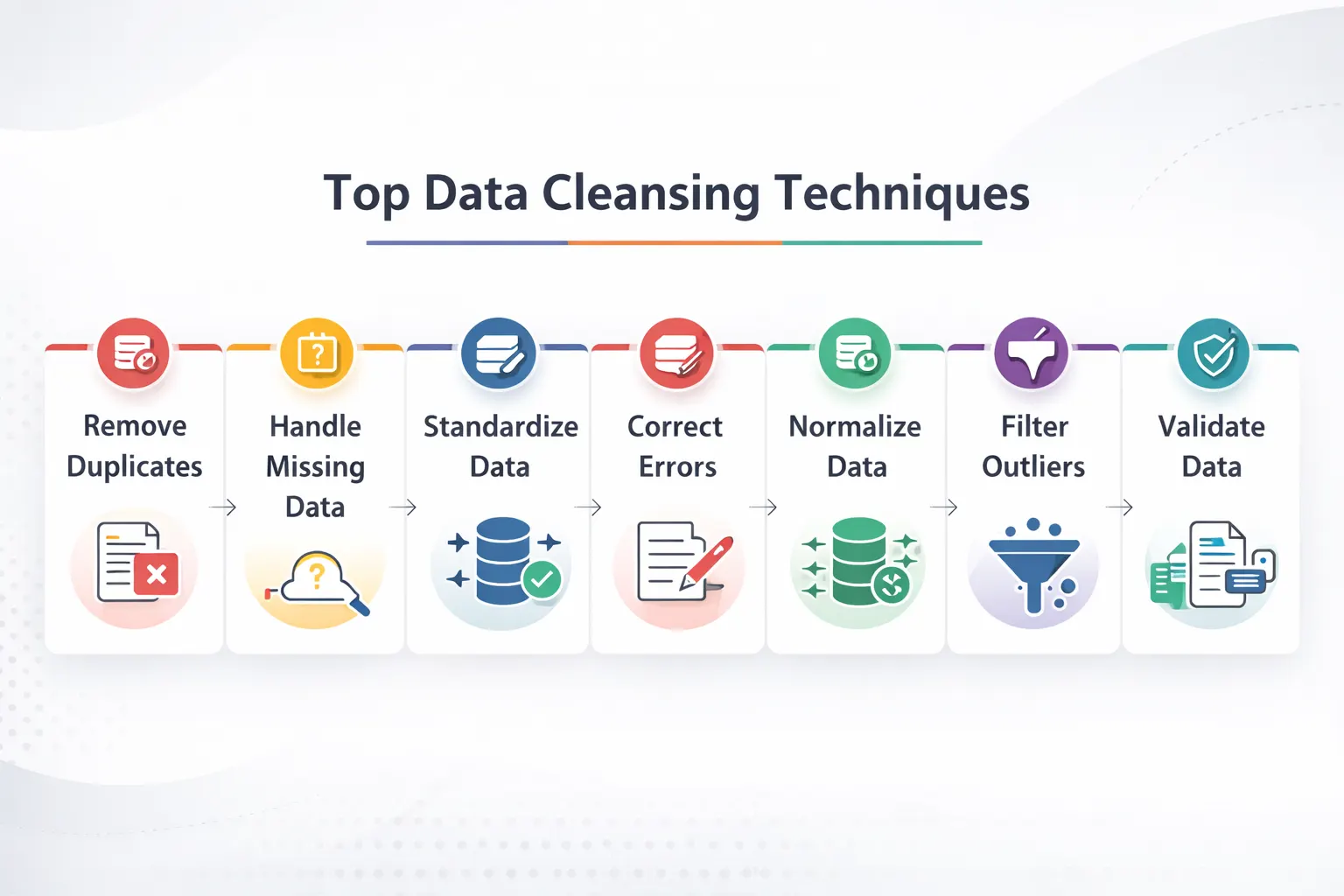
top data cleansing techniques

Here are the main data cleansing techniques that you can use for cleaning your messy data:

1. Finding and Correcting Duplicates

Duplicate records occur when details of people or transactions are entered twice. 

The two types you need to look for include: 

  • Exact duplicates: Identical duplicates that are easy to spot and remove. 
  • Similar Duplicates: These are duplicate entries with slight variations, such as “John Simon” and “Jon Simon”. Such entries require smarter detection and removal strategies. 

2. Handling Any Missing Values 

Missing any data? Instead of deleting valuable information, you can try the following methods: 

  • Use Averages

Replace the missing numerical values with the column’s average value. This will have minimal impact on your report while ensuring other values are usable for processing.

  • Forward/Backward Fill

For any time series data, you can use the previous or next value to replace the missing data point.

  • Use Business Logic

Any missing transaction amounts can be marked as zero. For missing customer information, you can mark it as “unknown”. This will retain the values in your data set rather than deleting the entire entry. 

After understanding the process, the next step is choosing data cleaning tools that automate profiling, standardization, and error removal.

3. Standardize Your Formats 

A frequent problem that arises in data warehousing is inconsistent formatting. This leads to data sets failing to be properly grouped or joined together in tables.

To prevent such issues, consider standardizing the following factors: 

  • Text: Use consistent spacing and capitalization
  • Dates: Ensure all dates follow the same Data, Month and Year format
  • Categories: Group similar values under labels 
  • Phone Numbers: Remove any dashes or special characters

How does this work? A good data-cleansing example is converting all dates to the “DD/MM/YYYY” format to ensure proper sorting.

4. Dealing with Outliers

Outliers are extreme values or data entry mistakes that can ruin your entire report. For example, a wrong decimal can turn “$78.00” into “$7800”.

To prevent this, use statistical methods and business rules to identify such mistakes. These include smart formatting, such as “number only” for dates and amounts.

You can also use conditional formatting like “ages can’t be negative” to ensure correct values.

What Are Data Cleansing Best Practices?

Below are the best data cleansing practices that can help you save valuable time:

1. Begin with Data Profiling

Before understanding what data cleansing is and how to use it, you first need to understand your data.

Ensure that you run the basic analysis on your data, like:

  • Identifying the missing values in your columns
  • The min and max values
  • Any unique values that appear in category fields

This type of “data profiling” helps you identify problems in your data. It can help you choose the right approach towards data cleansing tools.

2. Create Processes You Can Repeat

Cleaning data manually can be very difficult. Thankfully, you can use automated scripts and tools that can do this for you.

Data cleansing should follow a repeatable, easily codable logic. This will help you control and test the process for easier repetition.

3. Document Everything

Report each step in your data cleansing process and document it. This will help you audit and troubleshoot any issues faced during this process.

Such documents will help you identify any inconsistencies or data deletions during your cleansing.

4. Test Your Results

Done with your data cleansing? Make sure that you verify your data:

  • Check for any missing values after the process 
  • Compare your data distributions before and after the cleansing
  • Run sample reports to make sure everything looks great

5. Iterate and Improve

Data cleaning is an evolving process. As your business needs grow, you will have new data that needs cleansing.

Ensure you stay up to date with the latest trends and update your tools.

In larger pipelines, ETL tools help apply cleansing logic before data reaches analytics platforms.

Popular Data Cleansing Tools

Confused about which data cleansing tools you should use? Here are my recommendations:

Tool Category Examples Best For
Programming Libraries Python (Pandas), R (tidyverse) Custom, flexible cleaning for data scientists
Open Source Tools OpenRefine, Dedupe Interactive cleaning and duplicate detection
Validation Frameworks Great Expectations, dbt tests Automating data quality checks
Enterprise Platforms Informatica, Talend Large-scale, organization-wide data governance


Conclusion: From Clean Data to Real Business Value

Data cleansing is the foundation of every great decision you make as a team in your business. It is what enables a great company to expand into a global giant.

But for more accurate reports and better forecasting, you need to make a lot of effort. This will require the right skills, using the right tools, and the perfect approach.

Instead of wasting your team’s valuable hours to get inconsistent results, why not hire an expert? They can partner with your team to provide incredibly accurate data cleansing at lower business costs.

For Excel and BI workflows, Power Query in Power BI is a practical option for cleaning messy datasets before reporting.

At Augmented Systems, we specialize in transforming any messy data into clear insights. Our experts do the heavy lifting for you, building a reliable pipeline from your clean data.

Our years of experience serving global industry leaders have refined our approaches and made them more efficient. Whether it’s data migration services or building dashboards, our team at Augmented is always at your disposal.

Ready to make your messy data work for you? Contact Augmented Systems today to build a smarter future for your business!

FAQs

1. What is data cleansing in simple terms?

Data cleansing (also called data cleaning) is the process of finding and fixing errors in your data. This includes removing duplicates, filling missing values, standardizing formats, and correcting typos. The goal is to make your data accurate, consistent, and ready for analysis.

2. What are the key data cleansing techniques?

Common data cleansing techniques include removing duplicate records, handling missing values (e.g., using averages or forward fills), standardizing formats (e.g., dates and text), detecting and removing outliers, and validating data against business rules. Each technique addresses a specific type of data problem.

3. Why is data cleansing important for businesses?

Data cleansing benefits include more accurate reporting, better decision-making, improved customer insights, and increased team productivity. Studies show poor data quality costs U.S. businesses over $3.1 trillion annually, and analytics teams spend nearly half their time cleaning data instead of analyzing it.

4. What tools are used for data cleansing?

Popular data cleansing tools range from programming libraries such as Python (Pandas) and R (tidyverse) to open-source platforms such as OpenRefine. Enterprise tools such as Informatica and Talend handle large-scale cleansing, while validation frameworks such as Great Expectations automate ongoing data quality checks.

5. How does data cleansing relate to data migration?

Data cleansing is a critical part of any data migration services project. Before moving data to a new system, you must clean it to ensure formats match, duplicates are merged, and errors don’t carry over. Professional data migration services include cleansing as a key step to protect your new investment.
 

Categories
Blog Data Migration

Top ETL Tools in 2026: Features, Pricing, and Use Cases

In today’s world, most companies rely on large amounts of data to function day to day. But this data is usually stored across multiple platforms. To access it, you need to open different apps and platforms at work every day painstakingly.

Having your data from CRMs, databases, and spreadsheets in one place can help solve this problem. And that is exactly what ETL tools can do.

These ETL tools take data from different sources and put it in a unified form. Then, they put this unified data into your data warehouses.

Sounds perfect, right? Well, that might be true, but only if you pick the right ETL tool for your data migration framework.

To help you pick the best tool, I have compiled this comprehensive list of the top ETL tools for 2026. Whether you are looking for an enterprise solution or free, open-source ETL tools, you will find your match in this guide.

Let’s begin with a quick look at my top choices.

Quick Comparison: Top ETL Tools 

Here is a brief overview of the best ETL tools available today.

Tool Best For Key Strength Connectors
Hevo Data No-code teams Simple, reliable pipelines 150+
Fivetran Analytics teams Zero-maintenance pipelines 700+
Airbyte Technical teams Open-source flexibility 600+
Informatica Large enterprises Data governance & scale 300+
Talend Hybrid deployments Data quality & integration 900+
Matillion Cloud warehouse users Pushdown ELT optimization 150+
AWS Glue AWS ecosystem users Serverless Spark AWS-native
Azure Data Factory Microsoft shops Hybrid cloud connectivity 90+
Google Dataflow Stream processing Unified batch/streaming GCP-native
Apache NiFi Real-time data flows Open-source, visual UI 100+
Databricks Lakeflow Big data & ML Lakehouse architecture Native + files

How to Find the Right ETL Tool?

etl processBefore exploring specific platforms, let us first understand how you can choose the perfect ETL tool:
  • Connector Breadth 

Any modern pipeline requires data sourcing from various sources. These include SQL databases, SaaS apps, and file storage. 

For ETL tools, more connectors mean more compatibility. Any ETL tool with a large number of connectors will require fewer gaps to fill with custom code.

  • Real-Time Capabilities

Many companies now require real-time inputs, such as Change Data Capture (CDC), with sub-minute latency. Features like these are critical for ETL tools to provide real-time insights.

  • Pricing Predictability 

Any ETL tool with a consumption-based model might seem cheap at first. But as your usage grows, so will your bills.

Your preferred ETL tool must have predictable costing that you can account for every month.

  • Ease of Use 

An ETL tool that is not easy to use or interactive defeats the entire purpose of the tool.

Make sure you can use the ETL tool effectively. This ensures the tool saves you time rather than making your work even more complex.

Top ETL Tools for 2026

  • Hevo Data

Best For: Teams looking for simple and reliable pipelines

Hevo Data can connect multiple data sources through a unified no-code interface.

It also has a self-healing architecture that retries automatically if it detects a failed execution.

Moreover, the schema changes are handled automatically without disrupting downstream processes.

Key Features: 

Visual pipeline builders, auto-healing, and real-time monitoring.

Pricing: 

Event-based pricing model that starts at $299/month. You can also use their free plan, which provides access to 1M events per month.


  • Fivetran

Best for: Any analytics team dependent on cloud warehouses

Fivetran is a great tool for managing ETL pipelines with over 700 pre-built connectors. It supports automatic schema drift handling.

For better governance, Fivetran also works natively with Databricks Unity Catalog.

Key Features: 

700+ connectors, native Unity Catalog integration, and built-in dbt support.

Pricing: 

Usage-based Monthly Active Rows (MAR). There is also a free plan available.


  • Airbyte

Best for: Engineering teams that require customizable ETL tools

Airbyte is an open-source platform that is fundamentally free to use. It supports over 600 connectors and many advanced features.

For Airbyte, you will only pay for managed infrastructure or enterprise features. The base platform carries no costs, helping you save on subscription fees!

Key Features: 

600+ connectors, dedicated Connector Development kit for customisation and CDC support

Pricing:

Free open-source code, pricing for managed cloud services


  • Informatica IDMC

Best For: Large enterprises that carry complex requirements

Informatica primarily targets enterprises with advanced governance needs. This includes combined connectivity with AI-assisted mapping.

Moreover, the tool also supports metadata management.

Key Features: 

300+ connectors, AI-assisted mapping, and petabyte-scale processing

Pricing: 

Custom enterprise licensing with 3-6 month implementations


  • Talend Cloud 

Best for: Organizations looking for a hybrid deployment

Talent supports over 900 connectors. This includes deeper integrations with ecosystems such as Hadoop and Spark.

Moreover, it also combines ETL with data quality and master data management.

Key Features

Over 900 components, visual code generation, and hybrid deployment

Pricing

Custom pricing for tiered plans


  • Matillion 

Best For: Teams looking for cloud-native ETL for Snowflake, BigQuery, etc.

Matillion mainly focuses on pushdown ELT architecture. It leverages your cloud warehouse compute power instead of requiring a dedicated server.

In 2026, the company also introduced its AI assistant ‘Maia’ for pipeline optimization.

Key Features: 

Pushdown ELT, cloud warehouse optimization, and AI assistance

Pricing

Credit-based pricing model


  • AWS Glue

Best For: Organizations that are already dependent on AWS

AWS Glue is a serverless ETL solution based on Apache Spark. With a tight AWS integration, it can provide features like automated discovery and job scheduling.

Key Features: 

Serverless architecture, schema interfacing, and deep AWS integration

Pricing: 

$0.44/DPU-hour (DPU = Data Processing Unit)


  • Azure Data Factory 

Best For: Microsoft-centric enterprises

Azure Data Factory is a great ETL tool that supports hybrid cloud. It sources data from various destinations and provides on-premise cloud migrations.

Key Features: 

90+ connectors, visual and code-based development, and CI/CD workflows

Pricing:

Based on consumption and per-activity


  • Google Cloud Dataflow

Best For: Unified streaming and batch requirements

Using Apache Beam, Google Dataflow provides a unified architecture. It boasts serverless autoscaling.

Additionally, there are real-time use cases such as clickstream and fraud detection.

Key Features: 

Sub-second latency, auto-scaling, and Apache Beam compatibility

Pricing: 

Pay-per-use, depending on vCPU, memory, and data processed


  • Apache NiFi

Best For: IoT and hybrid streaming

Apache NiFi is a great open-source ETL tool. It provides an interactive flow design interface that is easy to understand.

The tool also supports automated data flow and provenance tracking for better efficiency.

Key Features: 

100+ connectors, real-time processing, and edge computing support

Pricing:

Free to use open-source tool

Many modern ETL tools now include data cleaning tools or built-in quality features to standardize records before loading.

How to Choose the Right ETL Tool?

Here is a handy guide on common situations and the best ETL tool for its specific needs:

Your Situation Best Tool Category Example Tools
No-code team that needs simplicity Low-code platforms Hevo Data, Matillion
Technical team that needs flexibility Open-source Airbyte, Apache NiFi
Large enterprise with governance Enterprise platforms Informatica, Talend
AWS cloud environment AWS-native AWS Glue
Microsoft shop Azure ecosystem Azure Data Factory
Real-time streaming required Streaming-optimized Google Dataflow
Big data + ML workloads Lakehouse platforms Databricks

If your project involves system replacement or cloud moves, data migration frameworks can complement ETL tools with a broader delivery structure.

Conclusion 

As ETL Tools continue to rise in 2026, you, as a buyer, will face many tough choices. One of these also includes deciding between ETL vs ELT for your data migration services

Whether it’s paid tools like Informatica or open source ETL tools like Airbyte, the choice depends on your exact needs.

While comparing ETL tools for your team, ensure that you consider your exact needs. These may include:

  • The number of connectors needed for your existing systems 
  • Deployment flexibility of your cloud environment
  • Latency needs for both real-time and batch scenarios 
  • The right pricing model 
  • Learning curve that your team can handle 

If you are planning a large-scale data project, your requirements will rise exponentially. To make sure your data stays secure, consider partnering with an expert for your data needs.

For professional guidance, I recommend consulting our experts at Augmented Systems. We specialize in helping organizations select the perfect ETL tools for their requirements.

Whether it’s for daily data unification or a massive data project, we can help you immensely. Our teams specialize in helping organizations select and implement the perfect ETL process for their current workflow.

Teams handling event-driven workloads should also understand real-time data analytics when evaluating modern ETL platforms.

Ready to make your data integration simpler and more efficient? Contact Augmented Systems today to receive the expert guidance you require.

FAQs 

1. What are ETL tools, and why are they important?

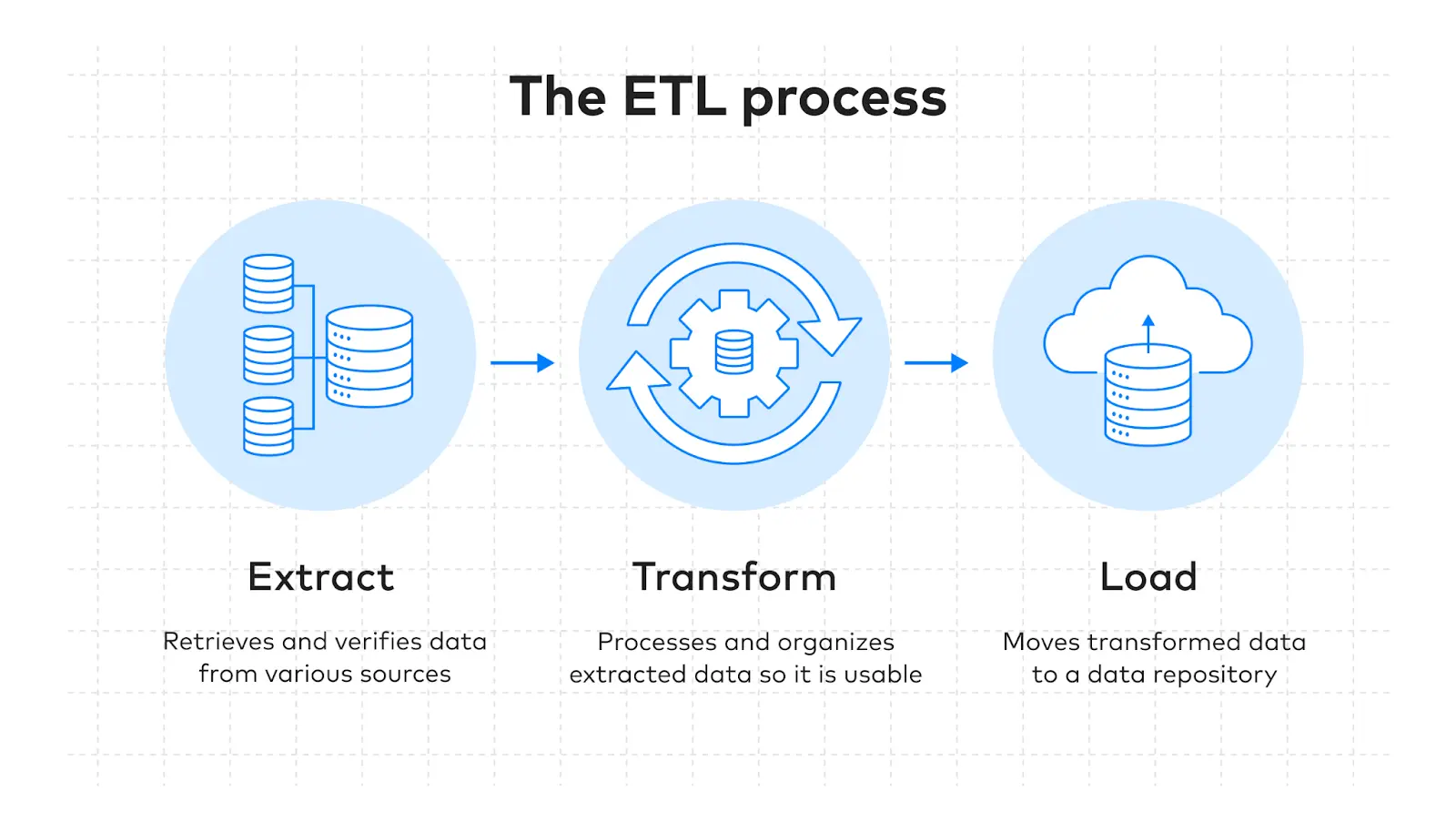
ETL tools are software platforms that extract data from various sources, transform it into a usable format, and load it into a destination like a data warehouse. They are essential because they automate data integration, save countless hours of manual work, and ensure your analytics are based on accurate, consistent information.

2. What is the difference between ETL and ELT tools?

The main difference is the order of operations. Traditional ETL tools transform data before loading it into the destination. Modern ELT tools load raw data first and transform it inside the data warehouse. This ETL tools comparison matters because ELT typically offers faster initial loads and leverages cloud warehouse power for transformations.

3. What are the best open source ETL tools available?

Popular open source ETL tools include Airbyte for its extensive connector library, Apache NiFi for real-time data flows, and Singer for lightweight pipelines. These tools offer flexibility, no licensing costs, and complete control over your data infrastructure, ideal for technical teams with specific customization needs.

4. How do cloud ETL tools differ from traditional on-premise solutions?

Cloud ETL tools like Fivetran, Hevo Data, and AWS Glue offer serverless architectures, automatic scaling, and pay-as-you-go pricing. Unlike traditional on-premise tools that require hardware maintenance and capacity planning, cloud solutions handle infrastructure automatically so you can focus on insights, not servers.

5. When should a company hire a data migration consultant?

A data migration consultant is valuable when you’re tackling complex migrations, selecting among multiple ETL tools, or ensuring minimal disruption during platform switches. At Augmented Systems, our consultants help you evaluate options, design robust pipelines, and execute migrations that protect your data integrity.

Categories
Blog Data Migration

Top Data Migration Frameworks Used by Enterprises

Moving your business data to a new place can be a daunting challenge. Whether it’s to a new modern cloud platform or an analytics system, data migration is not easy.

Surveys suggest that only around 16% data migration projects are actually delivered on time and on budget. This showcases how often data migration fails to live up to business expectations.

The solution? Ensuring a structured approach towards your data migration.

In this guide, I will walk you through a successful data migration framework.

With clear data migration examples, this guide will help you succeed with your data migration strategy.

Let’s get started by first understanding what a data migration framework actually is.

What is a Data Migration Framework?

Think of it like a detailed blueprint that strategizes every step of your data migration. Data Migration Frameworks are structured to avoid the risk of losing your data.
The steps involved predict potential data migration challenges and solve them before they become real issues.

Your Data Migration Plan: Step-by-Step Process

Any successful data migration project plan requires a pre-planned journey.

Here are the steps most experts recommend:

1. Assessment / Scoping:

It is very important that you plan your next moves before actually starting your data migration. Ensure that you collect your existing data and analyze its size and location. Create a backup if you can, and choose a strategy that fits your migration needs.

2. Design & Build:

Design a data migration framework that shows exactly how your data will be extracted and transformed. This stage is vital to building specific migration pipelines you will use to move your data.

3. Testing & Validation:

Ensure that you run multiple tests before moving your entire data. This includes migrating small batches of data first to test your current framework. Such checks will ensure better performance and accuracy in your final move. Tools used for ETL (Extract, Transform, Load) can work incredibly well for automating your testing.

4. Execution & Go-Live:

Let everyone know about your planned downtime window before carrying out your data migration. Before your final execution, make sure that you have a rollback plan. This will protect your data in case of unforeseen errors.

5. Final Review

Done with your data migration? Now it’s time to shut down your previous system. But before you do so, make sure your data survived the journey. Only after the final review of the data in your new system should you delete your old system.

Most enterprise migration plans also evaluate ETL tools to extract, transform, and load data with less manual effort.

How to Choose the Right Tool and Approach?

Making the right choice for your data migration framework will determine its final outcome. Here are some popular tools being used in the industry today:

Tool Category What Its Best For Common Examples
Cloud-Native Services Migrating to a specific cloud provider (AWS, Azure, GCP). AWS DMS, Azure Data Factory, Google Cloud Dataflow
Automated ELT/ETL Platforms Moving data from many business apps to cloud data warehouses. Fivetran, Matillion, Talend
Open-Source & Custom-Code Tools Unique, complex migrations where maximum flexibility is needed. Airbyte, Apache NiFi, custom Python scripts
Enterprise Legacy Modernizers Large-scale projects are moving off old mainframe or data warehouse systems. Informatica, IBM DataStage, Datastreak.AI or LeapLogic


Popular Data Migration Approaches

Here are the two main types of data migration you can choose to migrate your business data;

1. Big Bang Migration

In this type of migration, all of your data is moved at once. While this process is faster, it can also lead to severe server downtimes. Moreover, moving all your data at once can be risky. One wrong command can lead to complete data loss.

2. Trickle Migration

In this approach, your data is moved over time in phases. This results in a more complex process, but it is also safer than other alternatives. It allows business operations to continue working and causes minimal disruption.

Successful migrations start with data cleansing to remove duplicates, correct errors, and reduce legacy issues before transfer.

Why Do You Need a Data Migration Expert

Even after choosing the best data migration framework, your migration can still encounter issues. To ensure your move stays within budget and on schedule, you need a dedicated expert.

This is where an experienced data migration consultant comes into focus. They can help you avoid common issues associated with such data migration services.

Using their expertise, you can make sure that your data migration project plan runs flawlessly. They can turn your risky IT project into a smooth data transformation.

For your business needs, I recommend consulting our data migration experts at Augmented Systems.

We have a certified team of data migration consultants that specialize in executing custom data migration frameworks. They understand exactly what your business needs and tailor their strategies accordingly.

Augmented Systems believes in creating long-lasting partnerships. Our guidance and support go well beyond your project requirements.

Organizations modernizing data stacks should also consider real-time data analytics if they need faster decision-making after migration.

Ready to move your data with confidence? Contact Augmented Systems today to receive a tailored consultation on the right strategy!

FAQs

1. What is a data migration framework?

A data migration framework is a structured, repeatable methodology for planning, executing, and validating the movement of data from one system to another. It provides a blueprint to ensure the project is organized, secure, and successful, reducing risk for businesses of all sizes.

2. What should be included in a data migration project plan?

A robust data migration project plan is essential. It should detail key phases: scoping and assessment, design, testing, execution, and post-migration review. It must also include timelines, resource allocation, risk management strategies, and clear criteria for success.

3. Can you give a real-world data migration example?

A classic data migration example is a company migrating its on-premises customer relationship management (CRM) database to a cloud-based platform such as Salesforce. This involves extracting the old data, transforming it to fit the new system’s structure, and loading it securely, a perfect application of a structured data migration framework.

4. When should a company hire a data migration consultant?

Hiring a data migration consultant is wise when facing complex, business-critical moves, when in-house expertise is lacking, or when ensuring minimal disruption. A consultant brings proven methodologies, tools, and experience to navigate challenges, making the investment in expert data migration services highly valuable.

5. What is the role of an entity framework in data migration?

In application development, a data migration entity framework (like .NET Entity Framework) is often used to manage database schemas and create versioned scripts that define changes. It ensures the structure of the target database aligns perfectly with the application’s needs during a migration.

Categories
Blog Data Migration

ETL vs ELT in Data Migration: What’s the Difference and When to Use Each?

Overview
The debate of ETL vs ELT basically boils down to its sequence of operations:

  • ETL (Extract, Transform, Load): This method transforms Data before it enters its destination, and is best used for structured data stored in traditional data warehouses. 
  • ELT (Extract, Load, Transform): This method transforms the data within its target system and is thus perfect for modern projects that use cloud data platforms for storage.

In this blog, I will break down the major differences between ETL and ELT, and help you choose the right data migration method for your use case. 

___________________________________________________________________

Data is the new-age commodity that drives our tech-driven world.

With such large quantities of data moving around daily, a reliable data migration strategy remains very important for any modern company’s functioning. 

Choosing the wrong data migration strategy for your business can lead to productivity loss, daily bottlenecks, and wastage of valuable resources. 

Don’t worry, as I’m here to help you make your choice and understand the fundamental dynamics of ETL vs ELT quickly and easily! 

This will be critical to ensure you only invest in the best data migration practice that suits your needs.

Let’s dive in! 

ETL vs ELT: Table of Contents

  • ETL vs ELT – Quick Overview
  • What is ETL? (Extract, Transform, Load)
  • What is ELT? (Extract, Load, Transform)
  • ETL vs ELT: Detailed Breakdown of Key Differences
  • How to Choose Between ETL and ELT?
  • Final Verdict: ETL or ELT
  • ETL vs ELT: FAQs

ETL vs ELT – Table of Comparison

Here is a quick overview of the key differences that separate ETL and ELT:

Feature

ETL (Extract, Transform, Load)

ELT (Extract, Load, Transform)

Process Order

Transform, then Load

Load, then Transform

Data Handling

Best for structured, conformed data

Best for Raw, unstructured & structured data

Ideal For

Traditional data warehouses with strict compliance

Cloud data lakes & warehouses that are agile 

Tools Required

A separate processing server is required

Dependent on the target data platform (e.g., Snowflake, BigQuery)

Flexibility

Lower; schema-on-write

Higher; schema-on-read

Speed

Slower for initial load

Faster for initial data availability

What is ETL? (Extract, Transform, Load)

ETL is a time-tested legacy data transformation process. It involves data being first extracted from the source systems, and then being transformed through the following steps:

  1. Cleaning the Data
  2. Enriching the Data
  3. Aggregating the Data

This is done using a separate processing server. After this transformation is done, the data is loaded into the target data warehouse.

Using this “transformation-before-load” approach in ETL ensures that only high-quality usable data is filtered and entered into the new storage.

In my opinion, this reliability makes ETL a cornerstone of traditional data migration services

Let me walk you through some of its key characteristics.

Key Characteristics of ETL

Best For: I believe ETL is ideal if your organisation requires strict data governance, traditional data warehouses, and teams working mainly with structured data.

  • Governed Data Quality: Using ETL, your rules are defined beforehand, and the data is standardized and validated accordingly before it reaches the target warehouse.

This ensures that the data is already compliant and validated, making the data transformation process a popular choice for regulated industries like finance and healthcare.

  • Optimised for Structured Data: ETL has proven to be a reliable method for transferring structured, relational data that is neatly categorised into tables and schemas.

Where ETL struggles with its efficiency is in moving massive volumes of unstructured data.

  • Mature Tooling: As a traditional choice, the ETL ecosystem is mature and enjoys the support of a massive library of powerful tools, such as Informatica and Talend.

This is beneficial as many established data migration services already have close integration with these popular platforms.  

Thus, ETL has proven to be a reliably powerful approach to data migration that benefits greatly from its traditional legacy. 

However, be aware that its rigid processes can cause unavoidable bottlenecks in today’s rapidly evolving world of big data and dynamic analytics. 

What is ELT? (Extract, Load, Transform)

Best For: ELT is the ideal choice if your company mainly uses data stacks that leverage modern cloud platforms, agile data projects, and teams working primarily with unstructured data. 

As a modern data migration method, ELT is powered by the bleeding-edge power and scalability of cloud data platforms.

Data is seamlessly extracted from its source and loaded immediately into highly scalable destination systems like a cloud data warehouse or lake.

In ELT, data transformation happens AFTER the data is loaded, using the power of the target system itself for its filtration and processing.

Key Characteristics of ELT

  • Unmatched Speed and Agility: As ELT involves loading raw data first, this data migration process is a lot quicker when compared to ETL. 

Analysts on the target site can then transform the data on the fly, enabling seamless exploration.

  • Handles All Data Types: ELT is the best migration option when it comes to unstructured data, with its unique “schema-on-read” approach providing incredible flexibility for moving data like JSON, logs, etc.
  • Harnesses Cloud Scalability: The major heavy lifting of transformation in ELT is done by scalable cloud engines like Snowflake, BigQuery, and Redshift.

They eliminate the need for a dedicated transformation server, significantly reducing infrastructure costs and processing times. 

If your organisation has already embraced a modern cloud-first approach to data storage, I would definitely recommend ELT as a go-to data migration strategy. 

It offers speed and flexibility without suffering from the drawbacks of favoring defined data structures.

ETL vs ELT: Detailed Breakdown of Key Differences

1. Core Philosophy & Data Handling 

ETL: Operating on a “schema-on-write” philosophy, data is required to be cleaned, structured, and conformed before it is stored at its target destination. This ensures better reliability and consistency, but sacrifices speed and agility of the data migration process. 

ELT: With its “schema-on-read” philosophy, raw data is loaded immediately to the target site, and structure is applied after it is received. This ensures that the original data is preserved completely and offers maximum flexibility for future analysis. 

Which is Better?

Between ETL vs ELT, the choice depends entirely on your use case. I can verify that ETL is excellent if you plan to enforce strict and regulated data models before migration. 

Meanwhile, ELT is better for data exploration, ML pipelines, and adapting to a changing business ecosystem.

2. Performance & Scalability

ETL: Being a traditional method, ETL’s transformation step remains its biggest bottleneck, especially when it comes to large unstructured databases. Scaling requires hefty infrastructure costs as a dedicated ETL server will need to be replaced. 

ELT: Leveraging the vast scalability of modern cloud data platforms, transformation jobs can run parallel to the data migration process. This ensures minimal bottlenecks and offers seamless transformational power scalability in accordance with your storage requirements. 

Which is Better?

If performance and scalability are your focus during data migration, only consider ELT as your primary choice. 

With its seamless integration with cloud-computing capabilities, ELT provides vastly better speeds and scalability in comparison to ETL.

3. Flexibility & Agility

ETL: Any changes to transformational logic or organisational rules will often require restarting the data reprocessing from the start. This leads to a slow and resource-intensive process of data migration. 

ELT: Offering superior agility, a transformational logic change is just a simple SQL query away. This makes the iterative development of the data much quicker and seamless. 

Which is Better? 

I recommend ELT for businesses whose requirements evolve quickly and where data exploration is a key activity. 

4. Cost & Infrastructure

ETL: Requires investment and maintenance of proprietary ETL servers and software, leading to higher upfront and operational costs.

ELT: The cost model is entirely dependent on a consumption-based pricing of the cloud platform, offering cheaper pricing in most scenarios, as you only have to pay for the computing power and storage you are using. 

Which is Better?

Want to minimize your infrastructure management costs and enjoy a more hands-off approach to your data migration strategy? 

Look no further, as ELT incorporates flexible pricing models that will definitely benefit your company’s bottom line.

5. Skillset & Maintenance

ETL: Requires specialised skills to manage the complex ETL tooling and server infrastructure.

ELT: Leverages SQL skills that most data analysts and engineers already understand, reducing the steep learning curve and broadening the number of people who can work with the organisation’s data pipeline. 

Which is Better?

If you are looking to make multiple team members participate in your data transformation process, ELT is your best option to cut down on their learning curve and make the entire data migration process much faster. 

Still confused about the basics of Data Migration? Read my comprehensive guide on different types of data migration. 

How to Choose Between ETL and ELT?

Still confused about which data integration pattern is the best option for your needs? Let me help with some relatable scenarios: 

Choose ETL When:

  • You are migrating to a legacy on-premise data warehouse. 
  • You operate in an industry that is heavily regulated and follows strict data governance and compliance demands.
  • Your data is mostly structured, and reporting needs are already well-defined. 
  • Data quality and consistency are your highest priority. 

Choose ELT When:

  • Your data migration strategy is cloud-first and uses platforms like BigQuery or Azure Synapse. 
  • You work primarily with large volumes of unstructured data. 
  • Speed is critical, and you need raw data available for exploratory analysis. 
  • You require a more agile and flexible approach for your data teams. 

Need more help? Check out my blog on the top 10 data migration considerations

Final Verdict: ETL or ELT

Designing an effective data architecture is a multi-step process that requires the right data integration pattern to be sustainable and reliable for the future. 

Through this blog, I hope I’ve helped you understand the major differences between ETL vs ELT and the numerous pros and cons of these two data migration methods.

But an even bigger challenge during this process is its implementation.

Building a robust, reliable pipeline is vital to ensure your team can leverage a new data architecture more effectively.

And that’s where Augmented Tech Labs can help!

As an experienced data and analytics consultancy, our team can offer certified data architects who specialise in both ETL & ELT.

They are trained to help you navigate this journey seamlessly and ensure that you maximise your performance and ROI.

So, if you need more help in deciding the right data migration services, connect with us today to receive a free consultation! 

FAQs

1. What is the main difference between ETL and ELT?

The main difference in the ETL vs ELT debate is the sequence of operations: ETL transforms data before loading it into the warehouse, while ELT loads raw data first and transforms it inside the target system.

2. When should I consider professional data migration services?

Engage a professional service when designing your overall data migration strategy, implementing complex hybrid pipelines, or when you lack the in-house expertise to ensure optimal performance and governance.

3. Is ELT replacing ETL?

Not exactly. ELT is becoming the dominant pattern for new, cloud-native projects due to its flexibility and scalability. However, ETL remains critically important for governed, compliance-heavy use cases with structured data.

4. What are the key data migration best practices when using ELT?

Key data migration best practices for ELT include: implementing strong data cataloging and governance around your raw data, monitoring cloud costs closely, and ensuring your team has strong SQL skills.

5. Can ETL and ELT be used together?

Absolutely. Many organizations use a hybrid approach, using ETL for governed, mission-critical data marts and ELT for agile data exploration in a data lake, forming a modern “data lakehouse” architecture.

Categories
Blog Data Migration

8 Best Data Migration Tools for Moving Data in 2026

The post-COVID-19 era has shifted the role of data in digital transformation, bringing exponential growth in data collection.

But with more data comes more challenges, especially when it comes to migrating it to different platforms.

Transferring large amounts of data isn’t as simple as copying and pasting files. It can be messy, complicated, and even risky! In fact, many organizations face difficulties in migrating vast amounts of data securely.

And let’s be honest, no one wants to deal with the headache of missing or corrupt data

But here’s the good news: Data migration tools can simplify this daunting task and make your migration process much easier. 

These tools facilitate data transfer by simply selecting, preparing, and extracting data from one storage to another.

As a seasoned Data Migration Consultant, I’ve compiled a list of 8 game-changing tools that can help you transfer your data safely and efficiently

In this article, I’ll cover:

  • The 8 Best Data Migration Tools
  • Their Pros & Features
  • User reviews
  • The Role of a Data Migration Consultant

Let’s go!

8 Best Data Migration Tools 2026: Table of Contents

  • What are the 8 Best Data Migration Tools for Moving Data in 2026?
  • What are the Best Data Migration Tools? 
  • What Should You Hire a Data Migration Consultant?
  • Master the Art of Data Transfer with Data Migration Services
  • 8 Best Data Migration Tools 2026: Frequently Asked Questions

What are the Best Data Migration Tools? 

Data migration isn’t something you want to leave to chance or luck. One wrong move, and you risk losing all your valuable data. 

But it doesn’t have to be that way!

Data migration is not just about moving your data; it’s about transferring it quickly, securely and without disruptions. And the right tools can make all the difference.

After testing multiple tools, I’ve seen firsthand how the right choice can save time, reduce errors, and make the entire migration stress-free.

So, which tool actually works the best?

In this section, I’ve selected the best data migration solutions that make the process simple, scalable and straightforward.

Let’s break down the 8 best data migration services one by one.

1. AWS Data Migration Services

G2 Rating: 4.1/5 stars (51 reviews)

AWS Database Migration services are the #1 solution for homogeneous and heterogeneous database migrations, making them a go-to solution whether you’re keeping the same database type or switching to a new one.

One thing I personally appreciate is that it allows you to automate the conversion of source databases into AWS-compatible formats. That means less manual effort, fewer errors, and a smoother migration experience.

One of the best things about AWS DMS is its free plan, which offers 2160 hours of usage over 90 days.

Thus, you can initially use AWS’s services without incurring any cost.

However, once the free plan is over, charges may apply based on specific requirements, as given in the pricing table below.

Timeline

Price

Cost during the initial 90 days

Free

Cost per hour

$0.042 per server

Cost per month

$30 per server

What are the Key Features of AWS DMS? 

  1. Continuous Replication: Ongoing replication for disaster recovery and consolidation.
  2. Wide Support: Compatible with major commercial and open-source databases.
  3. Schema Conversion: Automates schema and code conversion for migrations.

What are the Pros of AWS DMS?

  1. Supports a diverse database platform.
  2. Ensures a secure data transfer with robust encryption.
  3. It can easily integrate with other AWS services. 

If you are already using AWS or planning to migrate to the cloud, AWS DMS is a great choice. Its free trial, automation features, and wide database storage make it one of the best solutions.

Plus, it is a well-rated tool that balances performance, security, and affordability, which makes it worthwhile considering.

2. Fivertran

G2 Rating: 4.2/5 (406 reviews)

Fivertran stands out for its automation capabilities and minimal maintenance requirements when it comes to top data migration tools.

You can rely on it to sync your data from multiple sources into one centralized system without the need for code.

One thing I really liked about Fivertran is its quick setup. It doesn’t require complex configurations, making it easy to get started.

Plus, its maintenance-free operation reduces manual effort, so you can focus on data analysis rather than troubleshooting your transfers. 

Fivertran’s no-code, experience-led data transfer is the reason it’s the second-highest-rated tool on my list. Plus, the Fivertran pricing model lets you pay for what you use. 

It has 4 pricing plans, as shown in the image below.

What are the Key Features of Fivertran?

  1. Connector Library: Offers pre-built connectors for popular data sources and SaaS.
  2. Real-time Monitoring: Sends alerts about pipeline status and issues.
  3. Incremental Updates: Syncs only changed data, minimizing transfer costs.

What are the Pros of Fivertran?

  1. Offers an automated, real-time data replication.
  2. It supports a wide range of data sources and warehouses
  3. Its maintenance-free operation minimizes manual efforts.

Fivertran is a well-regarded enterprise data migration tool known for its automation and ease of use. So whether you are migrating to a cloud warehouse or consolidating multiple data sources, it’s a reliable solution worth considering!

3. Matillion

G2 Rating: 4.4/5 (80 reviews)

Matillion ETL is cloud-native data integration software you’ll want to check out if you’re working with modern cloud environments, such as Snowflake and Amazon RedShift.

It’s designed to make data migration and transformation faster, easier, and more efficient. 

One thing that really stands out about Matillion is its user-friendly interface. Even if you are not an ETL expert, you can design workflows with ease. 

It also comes with an extensive library of pre-built connectors, allowing you to pull data from multiple sources without extra coding. 

With its high-performance processing and cloud-native architecture, Matillion earns the #3 spot on my list of ETL tools.

Additionally, Matillion offers three pricing brackets to help users with diverse needs find the right fit.

Refer to the table below for more detailed information on pricing options.

Plan

Price

Developer (for individuals)

$1,000

Basic (for growing teams

$2,000

Advanced (for scaling business)

Request Pricing

What are the Key Features of Matillion?

  1. Pushdown Optimization: Uses cloud data warehouse processing for better performance.
  2. Comprehensive Connector Library: Offers a wide range of pre-built connectors for data sources and destinations.
  3. Data Quality Tools: Built-in features for maintaining data integrity and compliance.

What are the Pros of Matillion?

  1. It is designed for cloud database migrations.
  2. It has an efficient ETL capability for data transformation.
  3. A user-friendly interface for streamlined operations.

If your business relies on cloud-based data warehouses and needs a powerful yet easy-to-use tool, I strongly suggest exploring Matillion! 

4. Stitch Data

G2 Rating: 4.4/5 (68 reviews)

Stitch Data is a cloud-based ETL platform that easily moves data from point A to point B.

The tool is worth considering if you are looking for a no-code, straightforward tool for seamless data movement.

One of Stitch’s biggest advantages is its extensive connectivity. With 140+ supported data sources, you can effortlessly consolidate data from multiple platforms into a single destination.

So, whether you’re a small business or a growing enterprise, Stitch scales with your needs, making it a versatile tool for everyone.

Plus, with its automation-driven approach and easy integration, Stitch earns the #4 spot on my list.

Stitch has three pricing plans, thus making it affordable for different business needs.

Plan

Price

Standard Plan

$100

Advanced Plan

$1250/month

Premium Plan

$2500/month

What are the Key Features of Stitch Data?

  1. Singer Integration: Supports open-source Singer for scripting uncommon data sources.
  2. Automatic Schema Detection: Adapts to changes in source structures, thus reducing maintenance needs.
  3. Usage-Based Pricing: Transparent pricing model scales with data volume, accessible for all businesses.

What are the Pros of Stitch Data?

  1. Automates ETL, freeing businesses to focus on data analysis.
  2. Integrates data from over 130 sources for comprehensive consolidation.
  3. Scales with business needs, suitable for any organization size.

Stitch Data is a fantastic tool if your priorities are simplicity, scalability, and automation. 

5. MuleSoft

G2 Rating: 4.5/5 (688 reviews)

MuleSoft offers a unique data migration approach, focusing on API-led connectivity, earning it the 5th spot on my list.

Instead of just moving your data, it connects applications and systems effortlessly, ensuring a smooth and secure data flow across platforms. 

Moreover, MuleSoft simplifies the process with its powerful automation and pre-built connectors. This makes it an excellent choice for large-scale data migrations where connectivity and security are the key. 

Despite its salient features, the exact pricing of this tool is unavailable. However, you can connect with their team for customized quotes based on your specific needs. 

What are the Key Features of MuleSoft?

  1. Anypoint Studio: An IDE for creating, evaluating, and implementing integrations and APIs.
  2. DataWeave: A language for data transformation that makes format mapping simple.
  3. Pre-built Connections: More than 200 connections are available for widely used applications to expedite integration.

What are the Pros of MuleSoft?

  1. It offers API-led connectivity for seamless integration.
  2. A good option for cloud-based data migration projects.
  3. Facilitates the flow of data between different systems.

From what I’ve seen, users have praised MuleSoft for its reliability, scalability, and API-driven data migration solutions.

6. Integrate.io

G2 Rating: 4.3/5 (199 reviews)

Integrate.io is a cloud-based data transfer solution that enables seamless data transfer from various sources. It stands out for its simplicity and flexibility.

What makes Integrate.io unique?

Its intuitive drag-and-drop, no-code interface!

So, whether you are a data expert or a beginner, you can effortlessly connect over 140 databases, data warehouses and cloud data sources.

With its no maintenance operations, Integrate.io offers a hassle-free data integration experience. That’s why it earned the #6 spot on my top data migration tools list. 

What are the Key Features of Integrate.io?

  1. Transformations: Offers 220+ pre-built data transformations for easy mapping and structure automation.
  2. Encryption: Secures streaming data with field-level encryption during migration.
  3. Customer Support: Provides 24/7 support, including video calls, for immediate issue resolution.

What are the Pros of Integrate.io?

  1. Streamlines the integration and movement of cloud data.
  2. A platform that is straightforward to use for managing data.
  3. Facilitates the integration of data from multiple sources.

While the pricing details for Integrate.io are not publicly available on the website, its features make it a compelling choice for businesses!

7. Airbyte

G2 Rating: 4.5/5 (49 reviews)

Airbyte is an open-source data integration and migration tool that enables you to build custom connectors to tackle long-tail integrations.

Its API-first architecture promotes transparency and collaboration, making it #7 on my list of best data migration tools.

With Airbyte, you can easily connect to diverse data sources, benefiting from its huge library of 550 pre-built connectors. This flexibility allows you to manage both structured and unstructured data.

Airbyte provides cloud and self-hosted deployment options, offering you greater control over your data. Additionally, the platform needs no maintenance and automatically handles updates to ensure a seamless experience for all users.

For detailed information about pricing plans, kindly refer to the table below.

What are the Key Features of Airbyte?

  1. No-Code Configuration: User-friendly interface for managing data pipelines without coding.
  2. Data Normalization: Optional post-load normalization for consistent downstream analytics.
  3. Flexible Deployment: Supports cloud and self-hosted options for data control and infrastructure.

What are the Pros of Airbyte?

  1. It can handle large amounts of data, allowing organizations to expand without problems.
  2. Users can create their connectors to connect to any data source or destination they require.
  3. Even non-technical individuals may use it easily, thanks to its user-friendly interface and clear instructions.

If you are looking for a highly customizable, open-source data migration solution that supports a wide range of data sources, Airbyte is a fantastic choice. (Also, a cost-effective one!)

8. Informatica Power Center

G2 Rating: 4.4/5 (85 reviews)

Informatica PowerCenter rounds out my list of best data migration software.

It is well known for its robust performance and high-security standards, built for businesses that deal with complex data environments and require detailed data management. 

With its enterprise-grade features, Informatica PowerCenter secures the #8 position on my list.

However, the pricing is not available on the company’s website, so it is recommended to contact the team directly.

What are the Key Features of Informatica Power Center?

  1. AI-Powered Automation: The CLAIRE AI engine automates and optimizes data management tasks.
  2. Multi-Cloud, Hybrid Support: Flexible deployment across on-premises, cloud, and hybrid environments.
  3. Metadata-Driven Intelligence: Uses metadata for insights, automating data discovery and improving lineage tracking.

What are the Pros of  Informatica Power Center?

  1. Adaptable to on-premises and cloud migrations.
  2. Effectively manages the movement of large data.
  3. High standards for data security to safeguard private information.

Users appreciate its reliability, automation capabilities, and ability to handle massive data workloads, making it an excellent choice for large-scale, structured migrations. 

What Should You Hire a Data Migration Consultant? 

A Data Migration Consultant is important in ensuring the successful data transfer between different systems. They help you develop a comprehensive migration strategy that aligns with your business objectives.

This involves:

  • Assessing existing data structure
  • Overseeing the execution of the migration process
  • Coordinating with stakeholders to ensure accuracy.

Additionally, Data Migration Consultants provide insights on customizing migration tools to meet your specific needs.

After completing the data transfer process, they offer ongoing support to ensure the new system works properly. Plus, the role of data in digital transformation is crucial, and a data migration consultant helps you use your data effectively in modern systems!

Master the Art of Data Transfer with Data Migration Services 

Choosing an efficient data migration tool is necessary for successful data transfer, especially considering data’s role in digital transformation.

Evaluating your needs before selecting a solution that aligns with your organization’s requirements is necessary. 

If you are having trouble choosing the right tool, we highly recommend consulting with a Data Migration Consultant to ensure that you’re all set for critical data migration processes.

A Data Migration Consultant’s expertise will guide you in transferring complex data easily.

In fact, if you’re looking for an experienced data migration consultant, we recommend working with an expert from Augmented…

Whether you want to migrate your data to a cloud-based server or pivot to a CMS-backed data ecosystem, our data migration consultant will help you figure out the best way to update your legacy systems while safeguarding your data!

So, if you feel you could benefit from the insights of a data migration expert, connect with us for a commitment-free consultation, and we’ll help you devise an end-to-end data migration strategy for your enterprise…

Happy migrating!

8 Best Data Migration Tools 2026: Frequently Asked Questions

1. Are there free data migration tools available?

Yes. There are several free data migration tools available out there. Open-source options like Talend Open Studio and Apache NiFi lets you move data without spending a dime. While they might require some technical expertise, they’re great choices if you’re looking for a cost-effective solution.

2. What is the usual cost associated with data migration services?

The cost of data migration services varies and depends on different factors. It depends on how much data you’re moving, how complex the process is, and what tools or experts you need. Small migrations might be affordable, but large, more complex ones can be expensive. It’s always a good idea to get a quote and plan ahead. 

3. Can I perform data migration without a consultant?

Yes, you can perform data migration without a consultant, but it’s not always the best idea. While small migrations might be manageable, bigger projects with large amounts of data might be a little tricky. A data migration consultant helps prevent data loss, minimizes downtime, and ensures everything runs smoothly. So, if your data is critical, we recommend hiring an expert. 

4. How much time does Data Migration take?

It depends! A simple migration might take just a few hours, while large-scale data migration projects can stretch over days or even weeks. Factors such as data size, system compatibility, and testing time all play a role. The key to a successful migration is good strategic planning, as rushing it can lead to mistakes. 

5. What are the biggest challenges in data migration?

Data migration isn’t always smooth sailing. Some of the biggest challenges include data loss, downtime, compatibility issues and security risks. The best way to avoid these problems is to back up your data, test everything beforehand, and use reliable tools. A little preparation goes a long way.

Categories
Blog Data Migration

What Are the Different Types of Data Migration?

You have your data and know that it needs to be moved. But how? Should you lift and shift, relocate, or copy and paste? 

Torn between the different types of data migration?

With data loss, downtime, unexpected system failure and much more at stake, we know that it’s a tough spot to be in.

The good part? You are in the right place as we break down different data migration types in this blog to help you figure out the best way to migrate your data.

Let’s get going and get you the answer you have been looking for. 

Top 7 Data Migration Types

Data migration isn’t just about moving your data from point A to B. It’s a tricky, complicated process and far more difficult than it appears. Over 80% of the data migration process fails or exceeds its budget. Why such a high failure rate?

The truth is that the data migration process is not just a matter of simple copy-and-paste. It requires meticulous data migration planning, strategy and flawless execution.

Each migration is unique, and one wrong decision can lead to complications and unexpected costs. To help you avoid these pitfalls, we have a list of 7 key data migration types, giving you the insights you need to choose the right approach. 

1. Storage Migration

Storage migration is the process of moving data from one storage to another storage location. This data migration process is often done to upgrade old, outdated or legacy hardware to a more modern and efficient system.

It incorporates data protection measures, such as data validation, cloning and eliminating irrelevant or old data.

You can use storage migration to move your data from an on-premise location to a cloud-based platform for faster, higher-capacity storage solutions.

Use Case:

  • Migrating data to cloud storage platforms like Amazon S3 or Microsoft Azure
  • To consolidate multiple storage systems into a centralized solution.
  • The transition from traditional hard drives to SSDs.

Key Benefits:

  • Improved performance – Enhances the data storage speed
  • Data Integrity – Accuracy and quality data migration
  • Reduced Downtime – Streamlined migration time and minimized downtime
  • Cost Efficiency – No additional license or software required

Key Considerations:

  • Downtime: Create a data migration strategy to minimize downtime.
  • Scalability: Choose storage systems that can grow as your business grows.
  • Data Integrity: Data accuracy, consistency and integrity are crucial.
  • Compatibility: The new storage systems should integrate with your existing system.

Data Migration Steps:

  • Data Validation 
  • Data Cloning 
  • Data Cleaning 
  • Redundancy

The storage data migration starts by validating your data for accuracy, quality and consistency between the source and target systems. Next, it creates a clone or replica of the data to prevent risks during transfer.

Outdated or redundant data is then cleaned, and backup copies are finally created to safeguard against potential failure or data loss. 

2. Database Migration

Database migration means transferring data between two distinct database systems. It is done for database systems that frequently need changes to the data language or protocols during the initial data migration.

The change is also visible in the application layer. Database migration modifies or adjusts the data without changing the structure.

Before starting your database migration, incorporate the following steps into your data migration planning.

  • Test the size of the database.
  • Evaluate the apps using the database. 
  • Ensure the confidentiality of your data.
  • Check your data migration strategy for accuracy and compatibility.

Use Case:

  • Migrating from older outdated versions like SQL Server 2008 to newer versions. 
  • Migration of on-premise database to cloud solutions like Amazon RDS or Google Cloud SQL
  • Transitioning from a relational database (like MySQL) to a NoSQL solution.

Key Benefits:

  • Better Performance – Faster queries, optimized indexing and better resource management.
  • Scalibitly – Can handle larger datasets and scale with your business.
  • Improved Security – Better compliance with security standards and data protection rules.
  • Cost Efficient – Reduces maintenance costs and infrastructure overhead.

Key Considerations:

  • Data Integrity: Validation of your data for accuracy and integrity
  • Downtime: Data migration planning should have minimal disruption
  • Performance Tuning: Optimization of indexes, queries and schema design
  • Compatibility: The new database system must support your existing applications and workflows

Database Migration Steps:

  • Data Assessment 
  • Schema Conversion
  • Data Migration
  • Validation 
  • Performance Testing

A database migration requires serious planning, testing and a proper data migration strategy. The process includes tasks such as analyzing the source database, adjusting the data schema to fit the destination source, maintaining data security and more. 

3. Cloud Migration

Cloud migration refers to moving your data from an on-premise location to a cloud-based storage platform. It also includes migrating your data, applications or services from one cloud location to another.

Use Case:

  • Moving from on-premise systems to the cloud, such as AWS and Google Cloud Platform.
  • Transforming across multi-cloud platforms or environments to avoid vendor lock-in.
  • Migrating scattered datasets to a consolidated and unified cloud platform. 
  • To scale and support global operations. 

Key Benefits:

  • Scalability: Supports growing business needs
  • Cost Efficiency: Cuts operational and maintenance costs.
  • Enhanced Data Protection: Cloud firewall and security protocols
  • Remote Accessibility: You can access data from anywhere
  • Performance Optimization: Faster processing and greater flexibility.

Key Considerations:

  • Data Security: Ensure encryption and security protocols to mitigate risks and vulnerabilities.
  • Compliance: Consider industry-specific security and regulations, such as GDPR or HIPAA.
  • Cost Optimization: To prevent overspending, monitor the cloud resource usage.
  • Expertise: Hire cloud specialists or train your employees for expertise.
  • Compatibility: Ensure that the legacy system is compatible with the new cloud system.

Cloud Migration Steps:

  • Assessment 
  • Planning 
  • Data Migration 
  • Testing and Validation 
  • Optimization 

Although cloud migration offers numerous advantages, large migration can take weeks or even months to complete, depending on your system’s complexity and data volume.

Cloud data migration services are becoming increasingly popular due to better storage options, cost savings and flexibility. It is predicted that the global cloud data migration services market will grow from $12.54 billion in 2024 to $69.73 billion by 2032

4. Application Migration

Application migration takes place when you move application software from one computing environment to another. This migration process often involves data transfers between on-premise servers, cloud platforms or different vendors.

This data migration also requires you to transfer not just data but also configurations, dependencies, and interfaces.

Use Case:

  • Moving legacy applications to cloud-based platforms, like AWS, Azure and Google Cloud. 
  • Shifting applications between different cloud providers. 
  • Upgrading from outdated application platforms to modern alternatives. 
  • Switching from one software vendor to another.

Key Benefits:

  • Better Performance: Faster processing, optimized workflows and better performance.
  • Cost Savings: Reduced maintenance and infrastructure costs.
  • Improved Flexibility: You can scale and upgrade your applications for your evolving business needs.
  • Modernization: Improved compatibility with modern technologies and cloud ecosystems.

Key Considerations: 

  • Data Integrity: Use Application Programming Interfaces and vendor tools to ensure data integrity.
  • Dependencies: Identify and manage dependencies on databases, APIs or other applications to avoid disruptions.
  • Data Compatibility: Data formats and models in the new and old systems should be compatible with each other.
  • User Experience: Provide training to end-users for better adaptability with the new interface.

Application Migration Steps:

  • Assessment 
  • Data Mapping
  • API Integration 
  • Testing 
  • Optimization

If you want to modernize your IT infrastructure, enhance your operational performance and reduce costs, application migration is a great option for your migration needs.

5. Business Process Migration

Business process migration takes place when you want to transfer your business data, applications, workflows and operations. It is usually done during mergers and acquisitions or organizational restructuring to reduce costs and improve business efficiency.

Use Case:

  • Integrating workflows, systems and processes post a merger or an acquisition.
  • Moving to modern ERP platforms like SAP or Oracle. 
  • To streamline workflows, eliminate inefficiencies and align processes. 
  • To maintain consistency across processes.

Key Benefits:

  • Enhanced Efficiency: Updated systems reduce redundancies and improve the workflow.
  • Cost Optimization: Significant cost savings due to consolidated processes.
  • Scalability: Allows you to scale your operations to meet your growing demands.
  • Standardization: Unified processes across departments, branches and newly merged entities.
  • Competitive Edge: Aligned processes with the latest technologies enhance your agility and market readiness.

Key Considerations:

  • Process Alignment: The migration of processes should align with your business goals and strategies.
  • Change Management: Clearly communicate and train your employees to onboard the new system.
  • System Integration: To avoid disruptions, seamlessly integrate disparate systems.
  • Testing and Validation: Verify and test all processes, applications and data for the new environment.
  • Minimal Disruptions: To avoid interruptions to your day-to-day operations, plan the timeliness of your data migration.

Business Process Migration Steps:

  • Assessment 
  • Planning
  • Integration
  • Testing 
  • Training

During business process migration, one of the key data migration considerations is to focus on process alignment, integrations and change management. Focusing on these factors, you can enhance your workflows and be ready for the competitive market. 

6. Big Data Migration

Big data migration refers to moving structured, semi-structured or unstructured data from one environment to another. You can move your data between on-premise, legacy, cloud and hybrid platforms.

Use Case:

  • Migrating big data to cloud-based platforms.
  • Moving from traditional databases to advanced tools, like Spark or Snowflake.
  • Combining data from multiple sources or silos into a centralized data lake. 
  • Migrating big data for real-time data processing and analytics.

Key Benefits:

  • Reduced Expenses: Reduced labor, hardware and maintenance costs.
  • Business Agility: Keeps your business moving without being locked up on a particular application or platform.
  • Centralized storage: Breaks data silos to bring your business into one single spot.

Key Considerations

  • Data Security: Opt for the right security measures to protect your data while migrating.
  • Technical Skills: Hire a technical expert or data migration consultant with intense knowledge of data migration tools and practices.
  • Downtime Management: Plan your migration with minimal disruption to your business.
  • Expenses: Integrating each application to move your data traffic is expensive and time-consuming.

Big Data Migration Process Steps:

  • Planning
  • Preparation
  • Design
  • Execution
  • Training

The best data migration practices will help you unlock your data’s true potential and make it work well. Proper planning allows you to transition to an efficient, scalable and modern platform using big data migration. 

7. Data Center Migration

Data center migration occurs when IT assets, applications, workloads and datasets are transferred from one data center to another. It can also involve moving between physical locations, modernizing infrastructure and moving to cloud-based data centers.

Use Case:

  • Transferring your IT infrastructure to a new data center or computing environment.
  •  Shifting operations or entire data centers to cloud-based data centers.
  • A company merger or an organizational expansion.
  • Migrating for disaster recovery by data backup. 
  • To modernize the existing infrastructure for regulatory requirements.

Key Benefits:

  • Minimal Downtime: Established processes and tools, scheduling and execution for minimzed downtime.
  • Reduced Costs: Less operational and maintenance costs.
  • Security and Compliance: Safeguards data and ensures regulatory compliance.
  • Scalability: Scalable solutions to accommodate your growing business.
  • Energy Efficiency: Consumes less energy and reduces environmental impact.

Key Considerations:

  • Downtime Management: Thoroughly plan the migration to reduce downtime.
  • Asset Mapping: Check all kinds of discrepancies, including hardware and software issues.
  • Data Security: Protect your data with robust encryption and security protocols.
  • Capacity Planning: Ensure that the new data center has enough capacity for current and future workloads.
  • Testing: Check for performance, application functionality and reliability post-migration.

Data Center Migration Steps:

  • Assessment and Analysis
  • Designing the Destination Environment 
  • Data Migration 
  • Testing and Validation 
  • Monitoring and Support

A well-planned data center migration is a reliable migration strategy that helps improve operational performance and efficiency. It can also reduce costs, modernize IT infrastructure, and improve operations.

Conclusion

No matter the type of data migration you choose, understanding the concept, choosing the right approach and selecting the right tools is the key to a successful migration.

Instead of rushing into the migration, it is always good to plan, think proactively and consider the possible risks.

Finally, finding the appropriate strategy is up to you and your business goals and needs. Are you planning to upgrade? Contact our team of data migration specialists at Augmented Systems today.

FAQs: 

1. What are the three stages of data migration?

The three basic stages of data migration include: 

  • Data Extraction 
  • Data Transformation
  • Data Loading

2. What are the main phases of data migration?

The main phases of data migration include: 

  • Preparing for the migration
  • Planning for the migration
  • Migration 
  • Operation and Optimization

3. What is migration in SQL?

SQL data migration is defined as moving data from one SQL server database to another. The data migration process looks easy at first, but it involves a lot of complexity, especially when migrating a large volume of data. 

4. What is the risk of data migration?

Data migration is a complex process that helps you transfer your data from your legacy system to a new system. It comes with risks, such as:

  • Data loss
  • Downtime
  • Data incompatibility 
  • Manual interfaces and more.

5. What happens after data migration?

After the data migration process is complete, you eventually abandon your old, legacy system or database.

Categories
Blog Data Migration

How to Choose AWS Data Migration Service?

Decided to migrate, but unsure which out of many data migration services are right for you?

With multiple AWS data migration services available, how do you determine which suits your needs?

When petabytes of data, mission-critical operations and your business is at stake, one poor decision can cost you far more than lost revenue.

The good news is that with the right guidance, you can select the perfect AWS service for your data move. How?

Let’s dig in and find the best AWS data transfer options for your needs.

What is AWS Data Migration Service?

AWS Data Migration Services (AWS DMS) migrates your data from your existing database (on-premise database, data warehouse or other cloud services) to AWS cloud services like Amazon RDS or S3.

For Example

Say you have a customer database in your legacy system. AWS DMS extracts the data, updates it in real-time and transfers it to the new systems. During this migration, the AWS DMS replicates your data and updates it while ensuring minimal downtime.

It handles different types of migrations, including:

  • Homogeneous Migrations: When you transfer similar datasets, like Oracle, to Oracle. 
  • Heterogeneous Migrations: When you transfer different types of datasets, like SQL Server, to Amazon Aurora.

AWS data transfer options and AWS migration tools are built with every business, data size, and migration need in mind. The best part? These tools handle all the migration needs while letting you focus on other core business activities.

But why AWS application integration services? Why is it a global and reliable migration solution? Keep reading.

Why Should You Migrate to AWS?

Businesses worldwide are moving to the cloud. The global cloud migration services market is projected to reach USD 29.2 billion by 2028.

The benefits why businesses moving to the cloud are many, including: 

  • Scalability
  • Security 
  • Cost efficiency
  • Better Infrastructure
  • Improved business efficiency 
  • Competitive advantage (Apart from many other reasons)

AWS DMS’s solid cloud migration strategy makes this transition more seamless with benefits such as minimal downtime, flexible database support, secure migration and more. The added benefit of automated data migration makes this process faster and more reliable.

Ready to move to the cloud and away from unexpected downtime, overrun budgets, hidden security risks and complicated integrations? 

6 Steps to Choosing the Best AWS Data Migration Services 

Selecting the right AWD DMS does not have to be overwhelming. All you need is the right strategy and tools to make everything click into the right place. Similarly, you can find the right AWS migration tools with the right cloud migration strategy.

To simplify things, here are the six most important steps to consider before selecting an AWS DMS for your business. 

Step 1: Define Your Migration Goal and Needs

Before you consider AWS DMS, it is important to understand and define your migration goals and needs. You can start by asking yourself a few questions, such as:

  • What types of data are you planning to migrate?
  • What is the scale of your data migration?
  • What is the source of your data?
  • Do you need real-time data replication?

You need to evaluate and understand whether your dataset is structured or unstructured. Is your data on an outdated system or in a different cloud environment? Are you migrating small data sets or multi-terabyte data? Do you need minimal downtime during the data transfer?

The types, scale and sources of your data influence the type of AWS migration tool you choose. For instance, large-scale migrations might need additional services like AWS Snowball for physical data transfer. You might also need real-time application features to minimize business disruptions.

Answering these questions will help you select a tool that supports your data types and size. 

Step 2: Evaluate and Analyze Different AWS DMS

The next step is to evaluate and analyze the different AWS data transfer options. AWS offers different types of migration tool options, customized and tailored for your business needs.

What are the options that AWS offers? Here’s a list of main services that you can choose from:

1. AWS Data Migration Services

As we saw earlier, AWS DMS is suitable for real-time data transfer and is a go-to option supporting heterogeneous and homogeneous migrations.

Key Features:

  • Supports different sources and target databases, like MySQL, Amazon RDS and Oracle. 
  • Offers continuous data replications with minimal downtime, 
  • Data synchronization between the source and target remains ongoing during migration. 

2. AWS Snowball

AWS Snowball is a physical device that helps you securely transfer your data from your current system to AWS. It is the right tool for you if you have a large dataset (petabytes), particularly when the bandwidth exceeds the internet’s capabilities.

Key Features: 

  • Quick and secure transfer of data with a physical device. 
  • Ideal for transfers where network connectivity is not sufficient. 
  • Your data is encrypted during the transport.

3. AWS DataSync

AWS DataSync automates and accelerates your data migration directly to Amazon S3, EFS or FSx. It is an ideal solution for moving large file-based data, such as file systems and data archives.

Key Features:

  • High-speed data transfer for large data files. 
  • Automatically transfers your data from your on-premise system to AWS. 
  • Supports different file systems, including NFS, SMB and HDFS.

4. AWS Transfer Family

AWS Transfer Family provides a managed service for migrating your data directly into Amazon S3. It supports secure file transfer protocols and integrates with your existing authentication systems.

It is a great choice if you want to maintain specific protocols and transfer files using protocols such as FTP, SFTP and FTPS.

Key Features:

  • Integrates with Amazon S3, offering seamless data management. 
  • Requires no infrastructure setup. 
  • Supports authentication protocols for secure file transfers.

You can select any of AWS’ services based on your data and business needs. 

Step 3: Security and Compliance 

Compliance and security are crucial factors when you are selecting a cloud migration service. Security breaches can result in data loss, reputational damage and financial fines.

During the migration process, you may lose your data due to any unavoidable circumstances or human errors. Therefore, to avoid potential lawsuits or damage to customer trust and protect your sensitive data, choose software that offers both security and compliance. 

How do you know if your chosen service is secure and follows security compliance?

  • Choose an AWS service that provides adequate security features, such as encryption at rest and transmission. 
  • Check if they follow industry standards like HIPAA, GDPR and SOC 2.

AWS DMS offers data encryption using the AWS Key Management System (KMS), and AWS Snowball encrypts your data before sending it.

Finally, depending on the sensitivity of your data, choose a service that meets your business and industry regulatory requirements.

Step 4: Consider the Cost of Migration 

Cost considerations play another important part when choosing a migration service. Imagine selecting a service solely because of its low initial costs only to face different challenges, including:

  • Downtime
  • Inefficiencies
  • Lost productivity
  • Additional recovery costs 
  • Costs for future updates
  • Data security

These challenges can add up quickly. A well-thought-out-cost strategy is important before selecting a migration service. Therefore, estimate costs beforehand, as pricing models vary based on the size and complexity of your data.

AWS DMS pricing is based on replication instance hours and the volume of data transferred. AWS Snowball has pricing based on device usage and data storage. AWS DataSync charges based on the amount of data transferred.

AWS also has an AWS Pricing Calculator that you can use to model the cost based on your migration needs. Finally, consider your data volume, transfer speed and service requirements for a cost-effective migration. 

Step 5: Plan for Downtime, Performance and Scalability

Imagine selecting a data migration service that shuts down your business operations for hours or even days. Or imagine selecting a service that supports your current data but does not accommodate your growing business needs.

The consequences?

  • Lost revenue
  • Prolonged downtime
  • Damaged customer trust 
  • Inefficiencies 
  • Bottlenecks 
  • Additional costs down the line

Ultimately, one wrong choice can hinder your growth and profitability and affect your competitive advantage in the marketplace. 

AWS DMS helps you minimize downtime during data transfer. However, certain interruptions might occur during large-scale migrations.

So, evaluate your tolerance for downtime. Then, choose a service that performs well during migration and offers scalability options for your growing business needs. 

Step 6: Support, Training and Maintenance

Last, but not least, it’s essential to choose data migration service providers that offer 24/7 support, thorough training and timely maintenance.

Why is support, training and maintenance important? Ask yourself these questions:

What happens if your team doesn’t know what to do with the new system? How would you handle issues that come knocking on your door post-migration? What if the system crashes and needs an update but no ongoing maintenance?

Your selection process should include necessary support, extensive documentation, tutorials and training. AWS offers support plans and 24/7 certificated cloud experts.

Choosing the right AWS DMS is crucial to future-proofing your business and data. Follow these steps to make an informed and confident decision. 

Conclusion

Ready to move your data with AWS DMS? If you are still weighing your options, don’t worry—we are here to help. Our team of experts provides scalable, secure and transformative services tailored to all types and sizes of businesses.

Our data migration service providers offer solutions ranging from infrastructure-as-a-service to software-as-a-service. They will guide you through every step of your migration process.

FAQs:

1. What are the AWS data migration services?

AWS Database Migration Service (AWS DMS) is a managed service that enables you to swiftly and securely migrate your databases and analytics workloads to Amazon Web Services (AWS).

2. Is AWS DMS an ETL tool?

AWS Database Migration Service (AWS DMS) is a managed ETL service that helps you migrate your databases to AWS.

One of the main benefits of using DMS is that your source database can remain fully operational during the migration process. Additionally, it supports both one-time migrations and ongoing replication.

3. What is the fastest way to transfer data to AWS?

DataSync can transfer data up to 10 times faster than open-source tools. It can also copy data over AWS Direct Connect or internet links to AWS for one-time data migrations, recurring data processing workflows, and automated data protection and recovery replication.

4. What is the full form of SFTP in AWS?

Secure Shell (SSH) File Transfer Protocol (SFTP) is a network protocol that is used to securely transfer data over the internet.

5. What is the ETL tool in AWS?

Extract, transform, and load (ETL) is the process of combining data from multiple sources into a large, central repository called a data warehouse. 

ETL uses a set of business rules to clean and organize raw data and prepare it for storage, data analytics, and machine learning (ML).

Categories
Blog Data Migration

Top 10 Data Migration Best Practices During Mergers and Acquisitions

Are you about to close on a merger worth millions of dollars?

Merging two companies is difficult. But merging their data? It is even harder.

A single data glitch can end your merger. Incompatible systems and watertight deadlines can also lead to data loss, downtime and delays.

The result? Jeopardizing your entire deal. Data migration during the merger and acquisition process has no margin for error.

For the same reasons, we have hand-picked the top 10 data migration best practices to help you migrate without risks.

Ready to know more? Let’s get into it.

What is Data Migration in Mergers and Acquisitions?

Data migration in mergers and acquisitions is the process of transferring data from two or more platforms or formats to a single platform. It involves the transfer of information, including

  • Customer data 
  • Product information 
  • Details of employees
  • Financial data, and more.

All this critical information is merged from different databases, formats and systems—some outdated, and others incompatible. Mergers and acquisitions can indicate a sea change for many companies. However, data migration can be a roadblock.

Do you know? 70% to 90% of mergers and acquisitions fail because of technology integration problems.

Then, What is the Necessity for Data Migration in M&A?

When two or more companies decide to merge their assets via financial transactions, they need to merge their large volumes of data into one unified system via data migration services.

Mergers—When two or more companies combine to form one single company. Say Company 1 and Company 2 merge to form Company 3. 


Acquisition—When a company acquires another company and takes ownership of it. For example, Company A buys out Company B to function as a new business.

The ultimate goal of mergers and acquisitions (M&A) is to increase the efficiency, effectiveness and profitability of the combined companies. Let’s look at this further.

Why are Data Migration Services Important for M&A?

Data integrity migration faces several challenges. These problems arise due to the complicated nature of integrating mismatched information, massive data and outdated systems. (Apart from many other problems.)

Moreover, most of the time, these mergers and acquisition processes involve large-scale migrations, mostly from cloud-to-cloud or server-to-cloud migration.

However, the mergers and acquisitions data migration should be swift to minimize structural and management changes. Additionally, it should be easy and simple to reduce stress for everyone.

If not implemented properly, you might face significant challenges during your merger, which can impact your migration success.

Challenges such as: 

  • Inconsistent data – It can lead to data loss, errors and inaccurate reports.
  • Downtime – It can impact your overall performance and productivity.
  • Data Loss – It can result in serious financial loss.
  • Compliance risks – It can result in fines and legal consequences.

Therefore, it becomes crucial to follow the best practices for data migration to make your merger and acquisition process easygoing and effective. One missed detail in your migration process can cost you millions of dollars.

10 Data Migration Best Practices for Effective Mergers and Acquisitions Strategies

The biggest risk in mergers and acquisitions could be the actual deal, but what is more risky? The Safety of Your DATA.

You need the best data migration strategy to avoid costly errors and technical and compliance issues and save yourself from the M&A nightmare.

If you don’t have one, here are 10 proven practices we have hand-picked to help your mergers and acquisitions data migration be secure, smooth and effective.

1. Data Migration Planning

Imagine moving in with the neighbors down the road, without informing them or making sure that they have the space for you.

Trying for a data migration with improper planning is the same. Moreover, even if the neighbors invited you (similar to an acquisition), would you be able to bring everything with you? No. Rather, you will have to fit in with their lifestyle.

Would should you do? Theoretically, your planning should start even before you finalize your agreement. Why? Because once the merger and acquisition is complete, you won’t be able to make amends.

You must have a plan from defining roles and responsibilities to having contingency plans to handle unexpected challenges.

Moreover, downtimes, delays and security breaches are not predictable. Therefore, thorough planning is essential to streamline operations or ensure access to tools and data.

2. Data Assessment

Now that you have a plan, you need to sort out your data. Each team or company has its own set of data that you need to migrate. This migrated data will eventually merge into a single system that is currently spread across different cloud storage platforms.

Moreover, the data that each company or team wants to migrate might have

  • Relevant data
  • Irrelevant data
  • Duplicate data
  • Outdated entries
  • Data or information with errors

With gazillions of this data, how do you identify the data that needs moving to the new system? A comprehensive assessment of your data before initiating the migration will help determine whether you need to transfer all your data.

In some cases, the migration will be more efficient if you leave some workloads or datasets behind. For instance, if the data is irrelevant to the new company, you could archive it using cloud storage services. This makes your data accessible but doesn’t take up much space.

3. Choosing the Right Migration Tool

After creating a migration plan and thoroughly assessing your combined data, the next step is to determine how you are going to migrate your data.

  • What tool will you be using?
  • Which tool will suit your needs?

Furthermore, given the role of data in digital transformation, the tool you decide to choose should be

  • Safe,
  • Secure,
  • Easy to use,
  • Offer faster transfer speeds

Apart from having the ability to support your migration requirements.

Selecting the right tool can impact how well your merger and acquisition unfolds. Numerous data migration tools are on the market, each with unique features and capabilities, such as data mapping, error detection, real-time monitoring, and more.

4. Data Security and Compliance

Did you know that 6.41 million data breaches were reported globally, impacting millions in the first quarter of 2023 alone?

It is crucial to consider the need for security during mergers and acquisitions, especially when you are handling all the personal and specific information of two or more companies.

Therefore, implementing robust security measures, during the data migration process, will help prevent

  • Data breaches 
  • Unauthorized access
  • Data loss, and more. 

In addition, if you want to avoid any legal or financial headaches in the near future, you need to ensure that you comply with data protection regulations and checks.

5. Data Compatability and Integrity

What is more tricky than finalizing a deal? Getting all your data from different systems and formats to work together nicely. In more technical terms, all the data must be compatible during your merger and acquisition strategies and planning.

How do you do that?

  • Plan ahead
  • Find out how you will map or integrate your data before migration
  • Run compatibility checks
  • Spot early issues, like mismatched formats and make changes
  • Transform your data into a standard format and streamline your merger. 

You can also use data integration tools and middleware to automate the entire process.

6. Establishing Governance Policies

Let’s say you are trying to merge a vast amount of data from two different companies. What is there are no clear rules and set guidelines during this merger? It will be a big chaos.

How? You might face high risks of

  • Data errors,
  • Inconsistencies, and even
  • Security breaches

When mishandled, different permissions, formats and critical information could mix everything up, causing significant loss. That is why you need strong data governance.

Set clear rules between both companies

Set policies on how you will handle, share or protect your data

Decide on how you will organize and secure the data

Lay down a solid foundation to avoid data issues and make the process feel like a breeze.

7. Testing the Migration

What if, after the entire migration, instead of feeling the excitement of the new merger, you find out that some of the information goes missing? Or all the critical data is jumbled.

Panicking right? Skipping or skimming your data migration testing results in this panic. A cascade of errors could affect your operations or damage your entire new system.

Therefore, run multiple rounds of testing for potential errors or problems. A testing phase usually includes:

  • Pre-migration testing
  • Testing during data migration
  • Post-migration testing

From data discrepancies and security gaps to performance issues, thorough testing is a must to avoid any unnecessary bigger problems.

8. Ensuring Backup and Recovery

System failure or human errors are prone to happen. What if your system suddenly fails due to unforeseen circumstances? Agreed, you have a solid data migration strategy, but “what ifs” are always a part of the migration process.

Are you ready for significant operational downtime or surprising financial losses?

With a strong databack or recovery plan, you are prepared for any surprise that might come your way. Furthermore, regular testing of your backup and recovery is equally crucial for times when you need it the most.

9. Analyzing and Updating Workflows

Think of a merger or an acquisition as mixing two different cultures together. What would happen if they don’t align? Chaos.

Similarly, if workflows or files aren’t aligned after the merger and acquisition, employees would struggle to find what they need.

Leading to chaos, frustration and wasted time. What more?

  • Sensitive information might fall into the wrong hands without clear access control
  • Inconsistencies can lead to confusion and errors
  • Crucial historical content may get lost
  • Processes and workflows might be impacted

Therefore, analyze, evaluate and update the workflows, especially in the early stages of your merger and acquisition.

10. Communicating With the Stakeholders

Finally, once you are moved to your new platform, communicate and collaborate.

This is crucial because everyone is new to this system and they might take some time to get used to the change.

Furthermore, the migration process during merger and acquisition involves various stakeholders

  • Data analysts
  • IT Teams
  • Compliance officers
  • Business leaders
  • Other employees

everyone should be in the loop about all the necessary changes and updates from all parties.

To do so, you can keep regular meetings and leverage data migration services to address complex challenges.

Conclusion

Are you considering data migration services during your merger or acquisition? Your organization may need some time to familiarize itself with the entire process. However, proper planning and implementation can help the process go smoothly.

If you are looking for a data migration company, contact our experts at Augmented Systems. We customize data migration solutions for all your unique needs.

FAQs: 

1. What are data migration best practices?

Here are the top 5 best practices to ensure your migration project goes smoothly.

  • Create and follow a migration plan
  • Understand and assess your data
  • Choose the right migration tool
  • Test and validate your migrated data
  • Ensure backup and recovery

2. What is data migration in mergers and acquisitions?

Data migration in M&A is the process of migrating data for one or more companies involved in a merger or acquisition to a consolidated system. 

3. What are the four types of data migrations?

The four main types of data migration include:

  • Storage Migration
  • Database Migration
  • Application Migration
  • Cloud Migration

4. What is the data room in M&A?

A data room serves as a central repository of information utilized during the due diligence process in mergers and acquisitions (M&A). It is a secure online platform where buyers and their advisors can access important documents related to the target company.

5. What is the first step in data migration?

Planning.

The first stage of any data migration is the planning stage. Many projects are derailed by inadequate planning before deployment begins. To avoid any challenges or migration failure, talk to our experts at Augmented Systems as you plan your migration.

Categories
Blog Data Migration

Data Migration vs. Data Conversion: What’s the Difference?

Ever happened that your system upgrade didn’t go as effortlessly as planned? Do data projects and system upgrades face setbacks?

More often than you may think!

Mismanagement of data projects can destroy your project before you even begin.

But what could be the reason?

One common source of misunderstanding often arises when you are grappling with the difference between data migration and data conversion.

If you want seamless transitions, consider working with professional data migration services to avoid common pitfalls.Don’t worry! We’ll break it down for you. 

Ready to avoid pitfalls and make the right data management decisions? Dig into the blog to understand data migration vs data conversion.

Data Migration: Benefits and Challenges

Data migration is a process of yielding, diversifying and optimizing your company’s digital landscape. It’s like your data virtually packing its suitcase to move from one system to another. 

You can also think of it as moving houses: moving from one legacy system to a new and updated system, such as the cloud. 

How? You can do so by seamlessly migrating your vast amount of data from one system to another. 

Why? Businesses and organizations often go through a data migration process for the following reasons.

  • Currently have an outdated or legacy system
  • To move their data to the cloud
  • To consolidate data on a unified platform
  • Adhering to the new regulations and legal changes
  • Better optimization of the system
  • For cost-effective solutions
  • Making data accessible to other applications
  • Poor security leading to cyber threats
  • To keep up with the latest technological trends
  • Website consolidation
  • Datacenter relocations 

Similar to moving house, migrating data from one place to another also has its benefits and data migration problems. Want to know more? Read ahead.

Benefits and Challenges

Data migration is a blessing, especially with the ever-growing data. (Over the next five years, the global data is anticipated to grow by over 180 zettabytes.) However, it comes with its own set of hurdles. Surprisingly, 83% of data migration projects either fail or surpass the budget.

A data migration process can make or break your business. It can either mess up your entire new system or take your business to new heights.

Benefits of Data Migration

  • Streamlined operations
  • Better data insights
  • A unified platform for all your data
  • Better integration
  • Enhanced security
  • Improve system performance
  • Enhanced data accessibility and flexibility
  • Business scalability
  • Digital transformations
  • Cost-effective in the future
  • Better compliance handling

Challenges of Data Migration

  • Risk of data loss and corruption
  • Long system downtime
  • Risk of data corruption
  • Compatibility issues between legacy and new system
  • High cost of migration, planning and execution
  • Unforeseen technical issues
  • Resistance to adaption from employees
  • Finding an expert 
  • Failing to integrate the process with existing processes
  • Lacking data protection measures
  • Unorganized data 
  • Data governance
  • Prolonged data mapping

The benefits of data migration are many but pitfalls are also a part and parcel of the migration process.

Data Conversion: Benefits and Challenges

Data conversion is the process of standardizing data by transforming it from one format, system or language to another. Think of it as repacking your bags depending on your destination.

Data conversion is digitally “translating language” from English to Fresh, with the same information for the new system to understand.

Every data conversion process is unique and depends on the individual processes. 

Say you are switching to a new CRM (customer relationship management software). Then, you will have to convert your spreadsheet data into a format accepted by the CRM.

Moreover, data conversion processes can be simple or intricate, depending on the amount of data, its complexity, and your project needs.

Data conversion does bring better efficiency and integration with your new systems, similar to things perfectly fitting into your new space. But what about the things that don’t fit into your new house as expected?

Benefits and Challenges

This “packing and repacking” of data is crucial for every business. Leveraging data conversion enhances your business efficiencies, but not without the challenges.

What benefits and challenges should you consider? Let’s have a look.

Benefits of Data Conversion

  • Reduced data redundancies
  • Improved data quality
  • Better data management 
  • Improved data visualization
  • Enhance user access 
  • Faster query execution
  • Expedite data processes 
  • Improved data collaboration and sharing
  • Reduced risks of non-compliance 
  • Precise and swift data analysis
  • Actionable insights

Challenges of Data Conversion

  • Data loss during conversion 
  • Misinterupped data 
  • Complexity in data mapping and transformation
  • Data integrity issues 
  • Compatibility issue between converted data and target system
  • Tight timelines
  • Budget constraints

Data conversion processes are essential if you want to optimize your data, make data-driven decisions and increase your bottom line. However, strategic planning is necessary to overcome the intricacies of data conversion.

Data Migration vs Data Conversion: The Key Differentiation

Corrupt files, lost information, failed system integration and a massive business setback—there is a lot to lose when it comes to data migration and data conversion processes.

So, put on your data goggles and step right into understanding data migration vs data conversion.

1. Primary Purpose of the Process

The main purpose of data migration services is to move data from one place to another without modifying the actual data. For example, you move customer information and sales data from a legacy system to a new CRM system on the cloud.

The main goal of data conversion services is to change the format or structure of your data so that the new system can operate accordingly.  For example, converting an RTF file to a Word file.

2. Scope of the Process

The process of data migration usually has a broader scope as it involves moving massive amounts of data. For instance, you might move your entire database or system, from product catalogs and order histories to customer data and sales records to a new ERP platform.

Data conversion services, on the other hand, take a more targeted approach, transforming only specific data to ensure it fits seamlessly into the new system. If you are integrating your financing data into an Australian system, for example, you will need to change US dollars into AUS dollars.

3. Associated Risks

Risks associated with data migration usually revolve around the integrity and security of your data. If incorrectly implemented, data migration may lead:

  • Data corruptions
  • Data loss
  • Downtime
  • Incomplete transfer 
  • Disrupted business (and much more.)

Data conversion services incorporate risks associated with how correct or incorrect your data is for the new system. Incorrectly converted data may lead to:

  • Misinformation
  • Losing crucial information
  • Misinterpretation 
  • Failed conversions
  • Disrupted business processes (and much more.)

Take, for example, in a failed data migration, you might risk your entire customer information, while in a failed data conversion, you might risk losing money due to incorrect currency conversions.

4. Top 5 Tools 2024

Whether you are migrating to the cloud or converting your data, having the right tools can entirely turn the game of your project. So, to help you make a better tool selection here are the top five data migration and conversion tools.

Data Migration: 

  • Fivetran
  • AWS Migration Services
  • Matillion
  • Apache NiFi
  • Microsoft

Data Conversion:

  • AWS Database Migration
  • IBM
  • Talend
  • SQL Server Integration Services
  • Oracle Data Integrator

To unlock the complete potential of your data, choose a tool that best suits your business and data needs.

5. Testing Strategies

Lost data, incorrect information and compliance issues are common headaches when it comes to data migration or conversion. One wrong step can jeopardize your entire project.

Amongst the various steps involved in the process of data migration and data conversion, testing comes as a very important one.

Therefore, incorporating data migration and data conversion testing strategy into your processes ensures a successful project without compromising your data or business. 

Side-By-Side Comparison: Data Migration vs Data Conversion

Still on the fence? Here is a tabular difference between data migration and data conversion.

Aspect

Data Migration Process 

Data Conversion Processes

Definition

Moving data from one system to another. 

Converting data to ensure compatibility with the new system. 

Data Transformation

Usually, data is transformed as is. 

Data restructuring and reformatting are essential for the new system. 

Complexity

Requires careful and strategic planning.

Requires accurate reformatting and structural changes. 

Risks

Data loss, downtime and more. 

Incorrect transformations and misinterpretations of the data. 

Tools & Techniques

Fivetran, AWS Migration Services and Matillion

AWS Database Migration, IBM and Talend

Use Case

System upgrade, increase in data volume or cloud migration.

When integrating a system with different data formats.

Data Handling

Large volumes of data or entire data sets. 

Focuses on converting specific data sets or files. 

Key Processes

Extracting, loading and moving data to a new system.

Extracting, loading and moving data to a new format. 

Required Skills

Technical knowledge and expertise are required to migrate data. 

Technical knowledge and expertise are required to convert data.

Example

Migrating from legacy system to the cloud. 

Converting data from CVS to JSON for a new web-based application. 

Time Taken

Longer due to large data sets.

Depends on the complexity of data transformations. 

While data migration and conversion are usually confused as the same thing, there is a lot of difference between them. Even though they both involve moving data, their purpose, role and outcome are distinct.

Make the Right Data Decision

Are you considering migrating your data or transforming it? Remember to first clear all your dilemmas, as one tiny glitch can lead to a domino of errors. 

If you have any confusion, contact our experts at Augmented Systems today. We offer tailored data migration services for all your specific business needs.

FAQs:

1. What is the difference between data migration and data conversion?

Data conversion simply means transforming your data from one format to another, whereas data migration means transferring your data from one place or system to another. 

2. What is data migration?

Data Migration is the process of moving or migrating data from one location to another, such as from a legacy system to a new system (the cloud.) 

3. What do you mean by data conversion?

Data conversion is the process of transforming your legacy data from one format to another so that it is compatible with the new or targeted system, application or software. 

4. What is the scope of data conversion?

To effectively scope a data conversion project

  • Define objectives,
  • Identify data sources,
  • Determine conversion methods,
  • Establish timelines,
  • Allocate resources,
  • Consider dependencies,
  • Assess risks,
  • Engage stakeholders, and
  • Outline deliverables

These steps will help ensure clarity and alignment with the project goals and requirements.

5. What is the key purpose of data migration?

The primary purpose of data migration is to consolidate data from various formats into a single unified platform.