
Every skilled professional knows that messy data is a huge problem.
Past studies show that poor data quality results in losses of over U.S. $3 trillion per year. This is the cost businesses have to share just because they did not clean their data properly.
So, what is data cleansing? Mainly, it refers to finding and fixing errors hidden in your raw data. This includes removing any duplicates or missing values that may cause issues in the future.
How do you properly achieve this cleansing? Well, it requires a lot of important steps!
To make it easier to understand, I have created this detailed guide. This will help you learn more about the basic data cleaning definition using practical data cleansing examples.
Let’s start by understanding what it actually means.
What Is Data Cleansing?
It is important to get a clear data cleansing definition before beginning the process.
Data cleansing is the identification and correction of errors and inaccuracies in your datasets. It includes performing actions like:
- Removing duplicate records
- Inputting any missing values
- Standardizing formats like dates and times
- Fixing any typos or spelling mistakes
- Ensuring the accuracy of data
For example, if you have two entries for “Thomas William”, you need to merge them. Duplicate entries like these can lead to false results when you process your datasets.
Without such proper cleansing, your reports will have false results. Even one incorrect name or data point can ruin the entire report and affect your prediction accuracy.
You may waste money marketing twice to a single customer. You may even think you have more customers than you actually do. All of these can be avoided by cleaning your data beforehand.
Why Does Data Cleansing Matter?
Did you know that analytics teams reportedly spent around 45% of their time just cleaning and preparing data?
That means spending almost half their time simply cleaning their data instead of finding actionable insights. Sounds like a waste of time, right?
Well, it’s not. The cost of ignoring the quality of your data is monumental. Poor data analytics can result in financial losses, wasted time, and even incorrect future insights.
What about when your data is clean? If done well, it can lead to benefits like:
- Improved decisions as you get more confident about your numbers
- More accurate reports leading to more consistent team collaboration
- Faster analytics that don’t suffer or break due to errors in the data
- Better service for your customers as you have the correct information
Top Data Cleansing Techniques
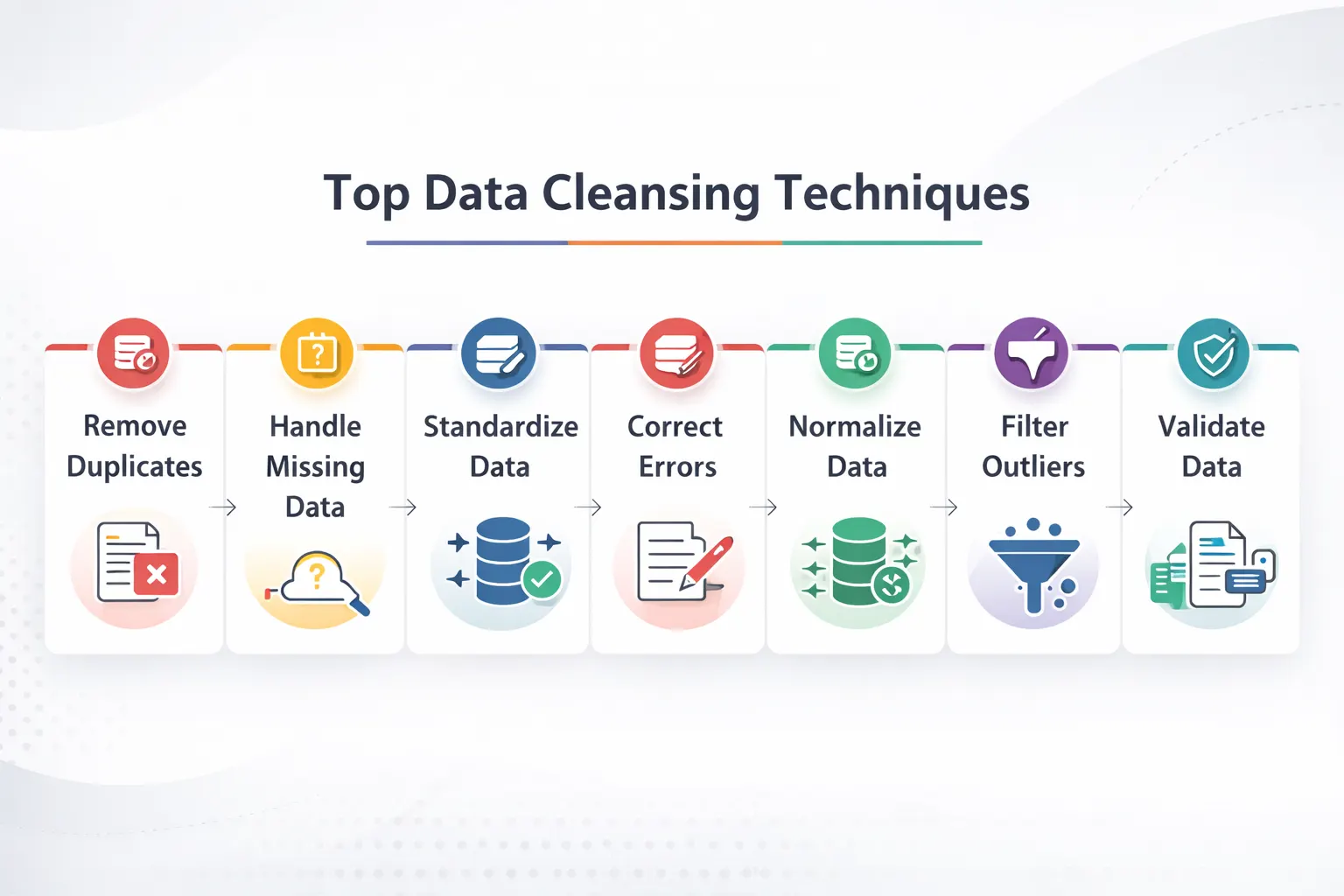
Here are the main data cleansing techniques that you can use for cleaning your messy data:
1. Finding and Correcting Duplicates
Duplicate records occur when details of people or transactions are entered twice.
The two types you need to look for include:
- Exact duplicates: Identical duplicates that are easy to spot and remove.
- Similar Duplicates: These are duplicate entries with slight variations, such as “John Simon” and “Jon Simon”. Such entries require smarter detection and removal strategies.
2. Handling Any Missing Values
Missing any data? Instead of deleting valuable information, you can try the following methods:
-
Use Averages
Replace the missing numerical values with the column’s average value. This will have minimal impact on your report while ensuring other values are usable for processing.
-
Forward/Backward Fill
For any time series data, you can use the previous or next value to replace the missing data point.
-
Use Business Logic
Any missing transaction amounts can be marked as zero. For missing customer information, you can mark it as “unknown”. This will retain the values in your data set rather than deleting the entire entry.
After understanding the process, the next step is choosing data cleaning tools that automate profiling, standardization, and error removal.
3. Standardize Your Formats
A frequent problem that arises in data warehousing is inconsistent formatting. This leads to data sets failing to be properly grouped or joined together in tables.
To prevent such issues, consider standardizing the following factors:
- Text: Use consistent spacing and capitalization
- Dates: Ensure all dates follow the same Data, Month and Year format
- Categories: Group similar values under labels
- Phone Numbers: Remove any dashes or special characters
How does this work? A good data-cleansing example is converting all dates to the “DD/MM/YYYY” format to ensure proper sorting.
4. Dealing with Outliers
Outliers are extreme values or data entry mistakes that can ruin your entire report. For example, a wrong decimal can turn “$78.00” into “$7800”.
To prevent this, use statistical methods and business rules to identify such mistakes. These include smart formatting, such as “number only” for dates and amounts.
You can also use conditional formatting like “ages can’t be negative” to ensure correct values.
What Are Data Cleansing Best Practices?
Below are the best data cleansing practices that can help you save valuable time:
1. Begin with Data Profiling
Before understanding what data cleansing is and how to use it, you first need to understand your data.
Ensure that you run the basic analysis on your data, like:
- Identifying the missing values in your columns
- The min and max values
- Any unique values that appear in category fields
This type of “data profiling” helps you identify problems in your data. It can help you choose the right approach towards data cleansing tools.
2. Create Processes You Can Repeat
Cleaning data manually can be very difficult. Thankfully, you can use automated scripts and tools that can do this for you.
Data cleansing should follow a repeatable, easily codable logic. This will help you control and test the process for easier repetition.
3. Document Everything
Report each step in your data cleansing process and document it. This will help you audit and troubleshoot any issues faced during this process.
Such documents will help you identify any inconsistencies or data deletions during your cleansing.
4. Test Your Results
Done with your data cleansing? Make sure that you verify your data:
- Check for any missing values after the process
- Compare your data distributions before and after the cleansing
- Run sample reports to make sure everything looks great
5. Iterate and Improve
Data cleaning is an evolving process. As your business needs grow, you will have new data that needs cleansing.
Ensure you stay up to date with the latest trends and update your tools.
In larger pipelines, ETL tools help apply cleansing logic before data reaches analytics platforms.
Popular Data Cleansing Tools
Confused about which data cleansing tools you should use? Here are my recommendations:
| Tool Category | Examples | Best For |
| Programming Libraries | Python (Pandas), R (tidyverse) | Custom, flexible cleaning for data scientists |
| Open Source Tools | OpenRefine, Dedupe | Interactive cleaning and duplicate detection |
| Validation Frameworks | Great Expectations, dbt tests | Automating data quality checks |
| Enterprise Platforms | Informatica, Talend | Large-scale, organization-wide data governance |
Conclusion: From Clean Data to Real Business Value
Data cleansing is the foundation of every great decision you make as a team in your business. It is what enables a great company to expand into a global giant.
But for more accurate reports and better forecasting, you need to make a lot of effort. This will require the right skills, using the right tools, and the perfect approach.
Instead of wasting your team’s valuable hours to get inconsistent results, why not hire an expert? They can partner with your team to provide incredibly accurate data cleansing at lower business costs.
For Excel and BI workflows, Power Query in Power BI is a practical option for cleaning messy datasets before reporting.
At Augmented Systems, we specialize in transforming any messy data into clear insights. Our experts do the heavy lifting for you, building a reliable pipeline from your clean data.
Our years of experience serving global industry leaders have refined our approaches and made them more efficient. Whether it’s data migration services or building dashboards, our team at Augmented is always at your disposal.
Ready to make your messy data work for you? Contact Augmented Systems today to build a smarter future for your business!
FAQs
1. What is data cleansing in simple terms?
Data cleansing (also called data cleaning) is the process of finding and fixing errors in your data. This includes removing duplicates, filling missing values, standardizing formats, and correcting typos. The goal is to make your data accurate, consistent, and ready for analysis.
2. What are the key data cleansing techniques?
Common data cleansing techniques include removing duplicate records, handling missing values (e.g., using averages or forward fills), standardizing formats (e.g., dates and text), detecting and removing outliers, and validating data against business rules. Each technique addresses a specific type of data problem.
3. Why is data cleansing important for businesses?
Data cleansing benefits include more accurate reporting, better decision-making, improved customer insights, and increased team productivity. Studies show poor data quality costs U.S. businesses over $3.1 trillion annually, and analytics teams spend nearly half their time cleaning data instead of analyzing it.
4. What tools are used for data cleansing?
Popular data cleansing tools range from programming libraries such as Python (Pandas) and R (tidyverse) to open-source platforms such as OpenRefine. Enterprise tools such as Informatica and Talend handle large-scale cleansing, while validation frameworks such as Great Expectations automate ongoing data quality checks.
5. How does data cleansing relate to data migration?
Data cleansing is a critical part of any data migration services project. Before moving data to a new system, you must clean it to ensure formats match, duplicates are merged, and errors don’t carry over. Professional data migration services include cleansing as a key step to protect your new investment.