
- What Is Application Integration?
- Real-Life Application Integration Examples
- Common Application Integration Challenges
- Legacy Systems
- Inconsistent Data Formats
- Security Concerns
- Growing Complexity
- 1. What is application integration in plain English?
- 2. Can you give me a real-life application integration example?
- 3. What tools do I need to connect my apps?
- 4. What makes application integration hard to do?
- 5. How do I integrate apps the right way?
Are you a business or part of a team that utilizes multiple software applications?
You might use Salesforce for sales and HubSpot for marketing. And of course, let’s not forget using Slack for everyday team communication.
Managing these software applications every day can sometimes be frustrating. It can lead to a wastage of precious time and a reduction in your productivity.
This is where application integration comes in as a business process. It ensures that your software applications work together for maximum productivity.
In this blog, we will take a closer look at its benefits and how you can use it for your business.
Let’s get started and take a closer look at what application integration is all about.
What Is Application Integration?
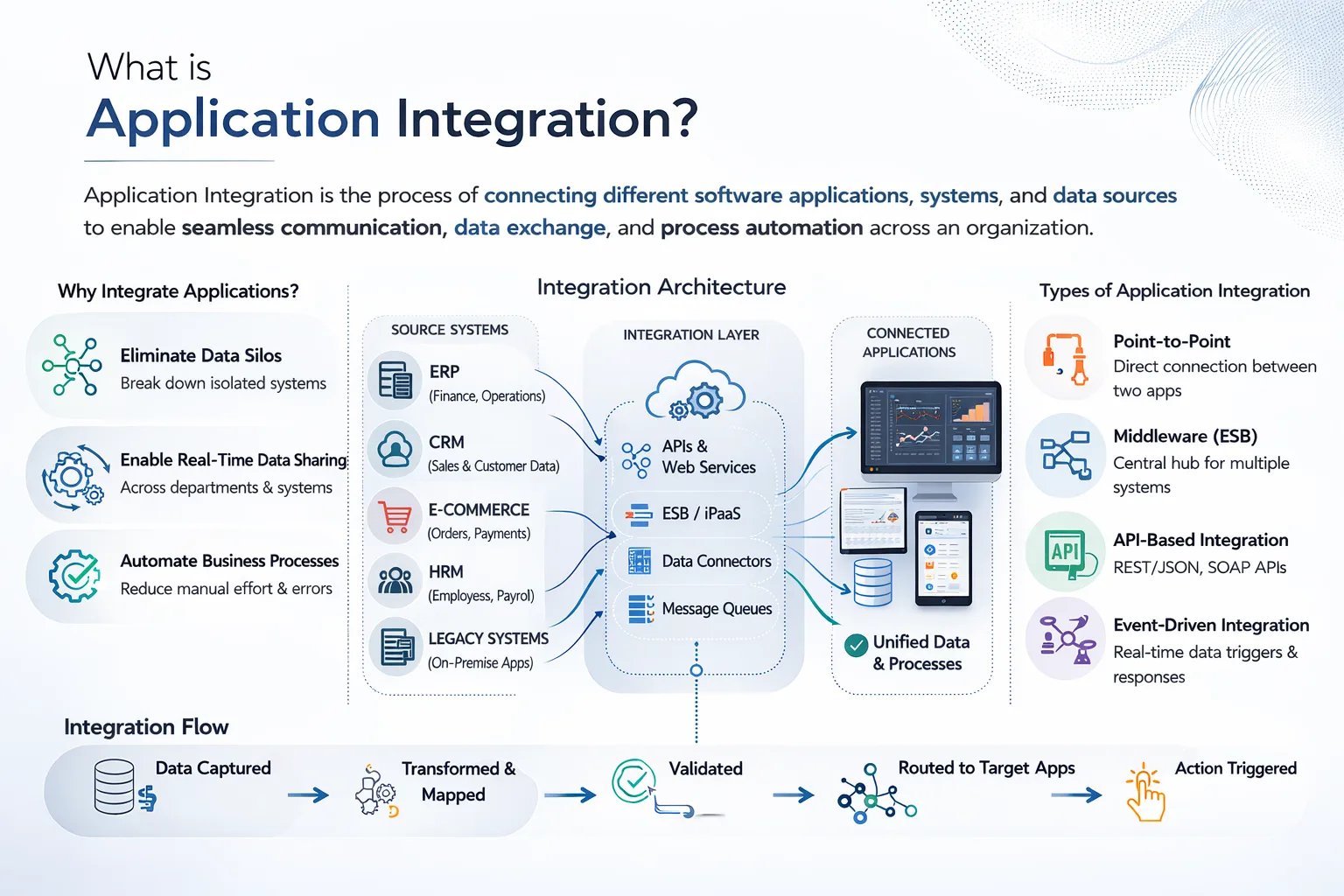
In the simplest terms, application integration is the process of connecting separate software applications. This helps them share data with each other to improve work efficiency.
You can think of it like building data bridges between various islands. Each application is an island connected by these bridges. This helps a free flow of information and better overall integration.
When these apps are integrated, your workload is significantly reduced. Data you enter automatically gets transferred between your apps. This reduces the need for manual typing and copy-pasting.
By applying best practices in application integration, you can eliminate repetitive daily tasks. It helps you focus on the work that actually requires your attention and time.
Real-Life Application Integration Examples
The incredible benefits and uses of application integration are not new. They were integrated into popular systems years ago.
Here are some common application integration examples to help you understand:
-
E-commerce Order Processing
In online stores like Amazon or eBay, application integration is used for every order.
When you buy something online, here is what happens under the hood:
- The payment system processes your credit card
- The store’s inventory system deducts that item from its stock
- The CRM updates your purchase history
- The store’s shipping system creates a label
- The company’s accounting system records your sale
This is a very basic example of how application integration automates an e-commerce site. Using its benefits, many manual tasks are done automatically.
The best part? All of this happens within mere seconds!
-
New Employee Onboarding
When a recruit joins a company, multiple business systems need to be updated. This involves HR adding them to payroll, IT creating email access, and facilities assigning them a desk.
Moreover, apps like Slack also need to add them to company channels.
Using something like Azure integration services, you can easily trigger all of these actions automatically. This can be done from a single HR entry of the employee!
-
Sales and Marketing Sync
Leads are a major revenue generator for most businesses. When a marketing form is filled out, it is important to notify sales of the new lead.
Using application integration, you can make this happen instantly. This lets sales immediately follow up on the lead. They can even set up automated responses to warm them up without any human intervention.
 Why Application Integration Matters?
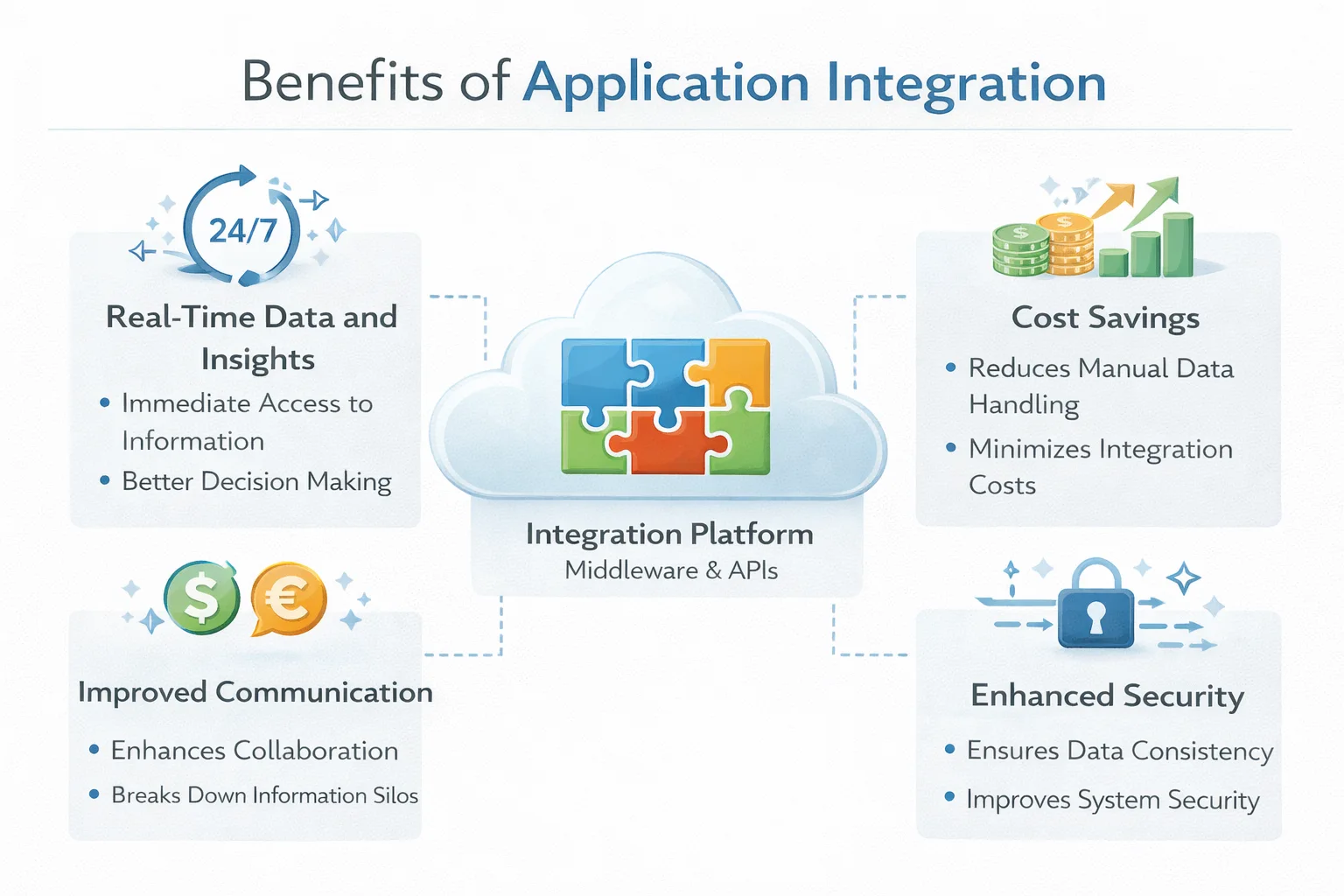
Here are the best benefits of connecting your apps using application integration tools:
| Benefit | What It Means for Your Business |
| Better Productivity | -Reduced time wastage on manual data entry.
-More focus on real work |
| Fewer Errors | Eliminating typos from copying data between systems |
| Real-Time Info | Everyone works with the same up-to-date information |
| Happier Customers | -Orders ship faster -Questions get answered quicker,– Problems get solved sooner |
| Lower Costs | Get more value from the software without adding headcount |
Common Application Integration Challenges
Before you start using application integration in your own business, it is important to understand its potential drawbacks.
Here are the common application integration challenges you may face:
-
Legacy Systems
Old traditional software usually doesn’t support many application integration tools. This requires modernizing them, which may incur extra work and planning.
-
Inconsistent Data Formats
One system using a “DD/MM/YY” format can have issues integrating with another that uses a “MM/DD/YYY” data format. It is important to align these formats with a single option before you start the integration.
-
Security Concerns
Every connection you add can pose a security risk if not handled properly. It is important that you handle your data carefully.
One way to ensure this is to check who has access and permissions for each connection.
-
Growing Complexity
When you connect many systems together, complications can arise. You must have the right strategy to reduce such issues.
Conclusion: Develop Your Own Application Integration Architecture
As we have seen through this blog, application integration is a powerful glue that connects different systems. It can automate your workflows and save your teams from manual busywork.
My favorite part about this method is that it does not require AI to achieve this task. This prevents a third-party AI agent from accessing your confidential company data.
The question that now remains is whether you are ready to implement it in your own organization.
To ensure it’s done properly, consider taking help from the experts at Augmented Systems.
For many years, Augmented Systems has earned its reputation as an industry leader in software consultancy for market giants. Their team specializes in using application integration to make your everyday tasks more efficient and easier.
You can consult with them to automate your workflows and design custom integration architectures for your needs.
Ready to make your data work seamlessly with every app? Contact the team at Augmented Systems and receive a free consultation on your next steps.
FAQs
1. What is application integration in plain English?
Application integration simply means making your different software apps talk to each other. For example, when someone fills out a form on your website, integration can automatically add them to your email list and sales system. No manual typing needed. Your apps just work together.
2. Can you give me a real-life application integration example?
Sure! Imagine a customer buys something on your online store. Application integration automatically charges their card, removes that item from your inventory, adds the sale to your accounting software, and sends a shipping request to your warehouse. This is done all at once, without anyone lifting a finger.
3. What tools do I need to connect my apps?
Application integration tools are software that do the connecting work for you. If you’re a small business, try simple tools like Zapier. For bigger companies, options like MuleSoft or Workato offer more power. These tools come with ready-made connectors, so you don’t have to be a tech expert to use them.
4. What makes application integration hard to do?
The biggest application integration challenges usually involve legacy systems that don’t play nice with new software, apps that store data in different formats, and keeping everything secure as you add more connections. It can get messy fast without a good plan.
5. How do I integrate apps the right way?
Follow these application integration best practices: Start with just one process instead of trying to connect everything at once. Pick tools with pre-built connectors to save time. Keep security front and center. And once it’s working, keep an eye on it so you catch problems early.